
Chapter 1
Install BuyerSpotter and sign in
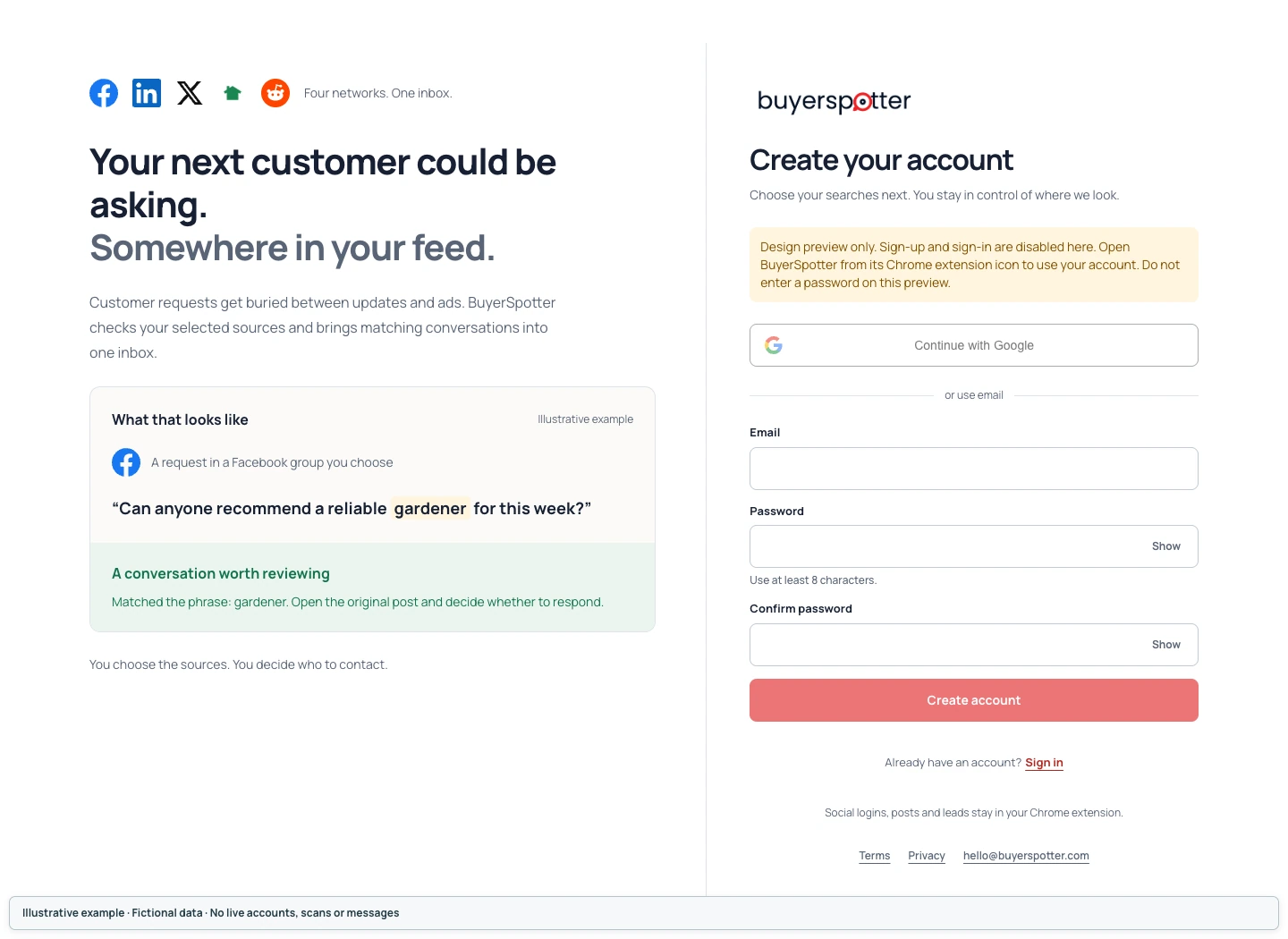
Install BuyerSpotter in desktop Chrome, then open it to create an account or sign in. Use the Chrome profile where you access your social networks. Signing into BuyerSpotter does not sign you into those networks.
- Open BuyerSpotter in the Chrome Web Store and install the extension.
- Open Chrome's Extensions menu and pin BuyerSpotter if you want quick access. Open the extension to continue.
- Choose Continue with Google, or use your email and password to Create account. Existing users can choose Sign in.
- Continue to Searches. Signing into BuyerSpotter and signing into a social network are separate steps.
 Enlarge screenshot
 Signing in, password reset and account problems
Use Sign in for an existing account. If you use Google, choose Continue with Google and the same Google account.
 Enlarge screenshot
 For an email-and-password account, enter your email and choose Forgot password?. Check the result shown by the product, then follow the reset email.
 Enlarge screenshot
 If you see a persistent error, keep the exact message and time for support. Do not repeatedly create new accounts to work around it. Never send support a password, sign-in code or payment-card details.
Chapter 2
Choose keywords for your business
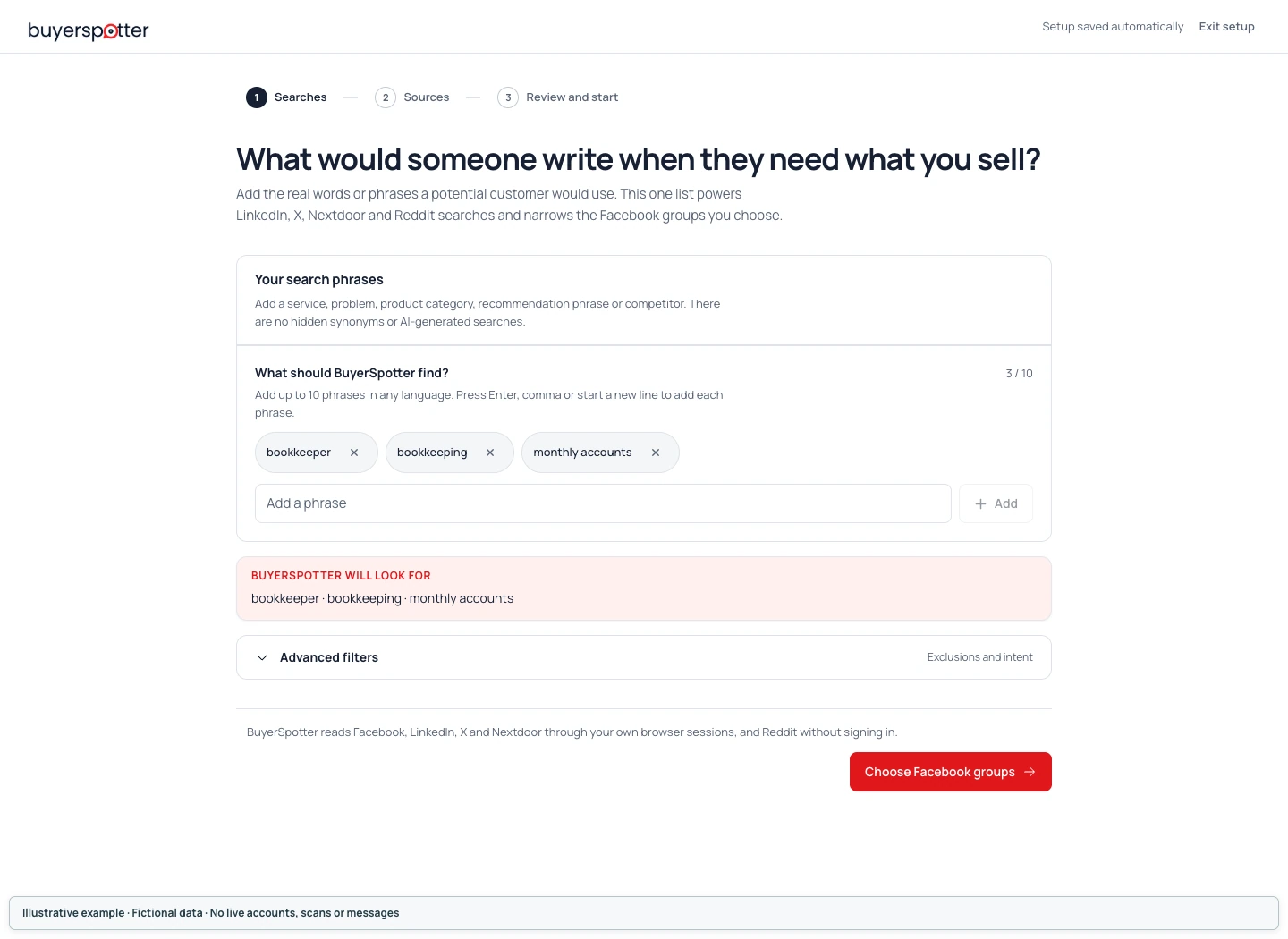
Start with a few short phrases describing your service or the customer's problem. Add each phrase separately with Enter or Add. BuyerSpotter accepts up to 10 phrases and treats them as alternatives, not conditions that must all match.
Imagine a customer asking for help before they know your company exists. Use their words, not just your business name or an internal product description.
- On Your search phrases, add a service, a problem, a product category or wording such as
recommend a bookkeeper. - Add each phrase separately with Enter or the Add button, then check that it appears as its own entry. Do not paste a comma-separated list and assume it has become separate phrases. Start with a small set you can review; the limit is 10 phrases.
- Check the BuyerSpotter will look for summary before continuing.
 Enlarge screenshot
 What the phrase list means
A post needs a match to at least one included phrase. Separate entries are alternatives, not a checklist of conditions. Adding bookkeeper and Austin separately does not mean every match must mention both. Keep a location, budget or specialist requirement as something to verify in the original post.
BuyerSpotter uses local matching rules, not an AI model that understands every possible way to describe your offer. A multiword phrase can match words together or sufficiently close to one another, including a different word order. It is not an exact-quotation search.
Do not rely on automatic synonyms, plural forms or translation. Shorten an overly specific phrase or add another wording as a separate entry when real posts show you need it. There is no user-facing Boolean, wildcard or exact-quote search mode: use plain words rather than operators, a full brief or an entire example library in one entry.
Advanced filters: exclusions and intent
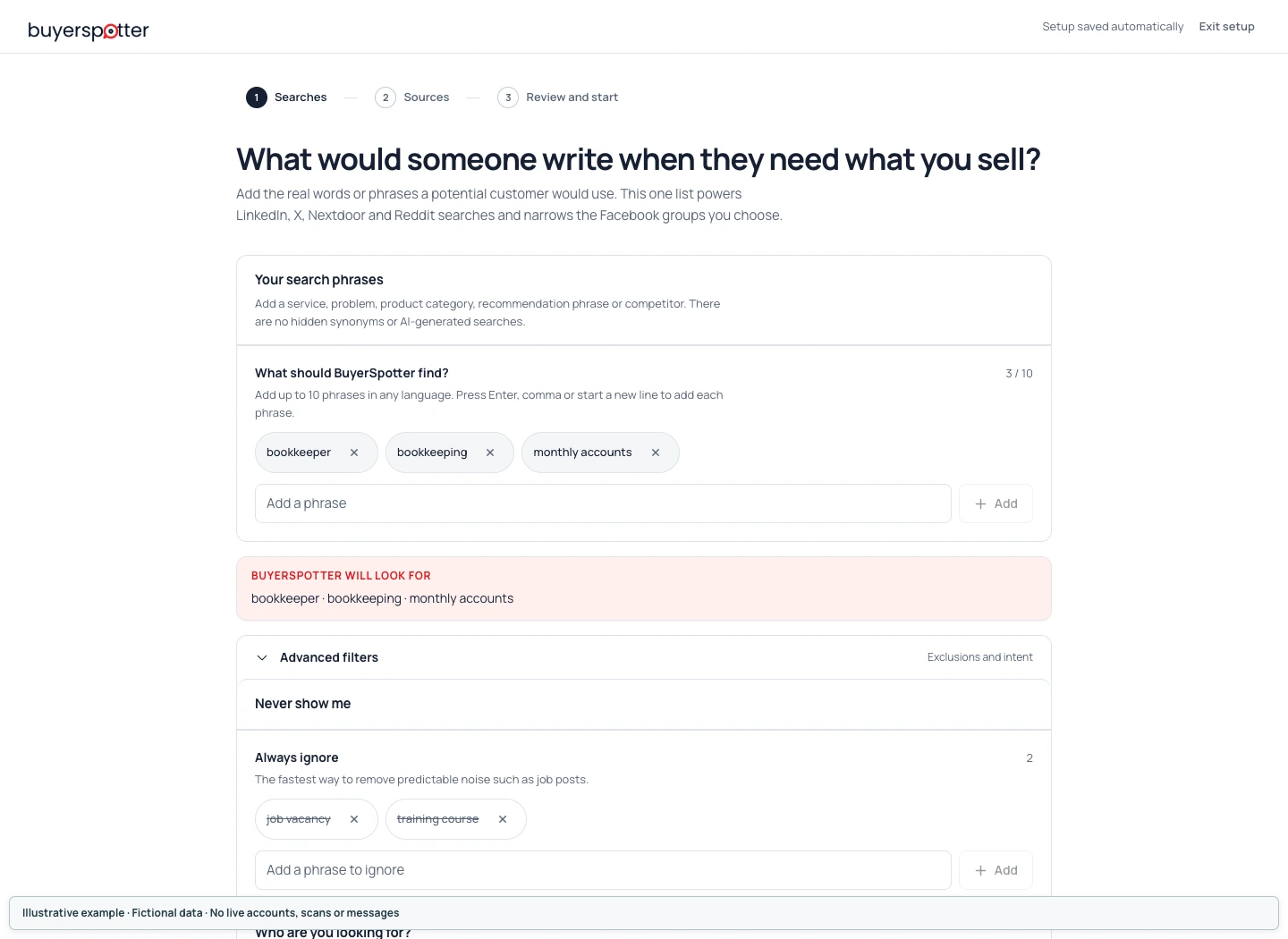
Open Advanced filters to see Always ignore and Who are you looking for?. Intent choices help describe and rank keyword matches; they are not proof that the author is ready to buy.
An exclusion is stronger than a preference: a matching excluded term can reject the whole post, even when it includes one of your search phrases. A single-word exclusion uses substring matching, so intern can also match internet. A multiword exclusion can match its words anywhere in the text, in any order. Test the full request, not just one sentence.
 Enlarge screenshot
 Find a starting point for your business
Choose the example closest to what you sell, then adapt it. Each phrase below is a separate entry. These are starting ideas, not search-volume data or a promise of results.
The linked public discussions illustrate how people describe these needs. Some are archived or resolved. They are wording references, not leads found by BuyerSpotter. To monitor Reddit itself, see Reddit keyword monitoring.
All 12 examples are available below.
PlumbingResidential plumbing repairs, including leaks and blocked drains.
A customer may name the broken fixture without using the word plumber.
Phrases to try separately
plumberplumbingblocked drainburst pipe
A request to review
Can anyone recommend a plumber? Our kitchen sink is leaking into the cupboard.
A match you might skip
Our plumbing team has new uniforms. Here is a photo from the workshop.
A request your first phrases could miss
Who can fix the dripping tap in my kitchen?
Consider this extra phrase if it describes work you offer:
dripping tap
Add dripping tap if that is work you offer. Keep plumber and plumbing as separate phrases because general word variations are not automatic.
Check an exclusion before using it
Possible exclusion: job.
Need a plumber for a small job: the kitchen tap will not stop dripping.
Excluding job also hides a homeowner describing a small job. Review the whole request before treating a work-related word as recruitment noise.
Public wording reference: reddit.com (opens a new tab). The teaching examples above are fictional, not quotes from these discussions.
Heating and air conditioningRepair and maintenance for the heating and cooling equipment you service.
People may name their equipment or describe the symptom instead of asking for an HVAC contractor.
Phrases to try separately
air conditioningAC repairheat pumpboiler repair
A request to review
Can anyone recommend AC repair? The unit runs but the bedroom stays hot.
A match you might skip
Air conditioning basics are the topic of our next training session.
A request your first phrases could miss
The furnace keeps shutting off. Who repairs these?
Consider this extra phrase if it describes work you offer:
furnace
Add furnace only if you service it. A heat pump phrase does not automatically cover a furnace, and a broad equipment word also admits discussions and adverts.
Check an exclusion before using it
Possible exclusion: training.
Need AC repair for our training room. It has stopped cooling.
Training can describe the room where a repair is needed. Excluding it does not distinguish that request from an advert for a course.
Public wording reference: reddit.com (opens a new tab). The teaching examples above are fictional, not quotes from these discussions.
Gardening and lawn careGarden maintenance and the outdoor jobs your team can take on.
Customers describe a particular job, while gardening discussions can use the same service words.
Phrases to try separately
gardenergarden maintenancehedge trimminglawn care
A request to review
Looking for a gardener to cut back the hedge and clear the path.
A match you might skip
I put our old garden maintenance photos into an album.
A request your first phrases could miss
Need someone to remove an overgrown shrub beside the gate.
Consider this extra phrase if it describes work you offer:
overgrown shrub
Add a specific problem such as overgrown shrub when it fits your work. Do not rely on gardener to cover every outdoor task or the plural gardeners.
Check an exclusion before using it
Possible exclusion: free.
Looking for a gardener. I am free on Tuesday to show you the work and discuss a quote.
Free may describe availability rather than a request for unpaid work. This exclusion would hide the appointment request.
Public wording reference: reddit.com (opens a new tab). The teaching examples above are fictional, not quotes from these discussions.
Cleaning servicesThe home, rental, or commercial cleaning jobs you actually provide.
A broad cleaning phrase may bring in checklists and cleaning-product discussions as well as requests.
Phrases to try separately
house cleanerend of tenancy cleaningcarpet cleaningoffice cleaning
A request to review
Can anyone recommend a house cleaner for a regular fortnightly visit?
A match you might skip
Our office cleaning checklist now includes the cupboard handles.
A request your first phrases could miss
Looking for oven cleaning before we hand back the keys.
Consider this extra phrase if it describes work you offer:
oven cleaning
Add oven cleaning if you offer it. End of tenancy cleaning will not cover a post that only names the oven. Remove starter phrases for services you do not provide.
Check an exclusion before using it
Possible exclusion: office.
Need a house cleaner for the flat beside the post office.
An exclusion applies to the whole text. Office can appear in a landmark even when the customer wants a home cleaned.
Public wording reference: reddit.com (opens a new tab). The teaching examples above are fictional, not quotes from these discussions.
Moving and deliveryHouse moves and the delivery jobs your vehicles and team can handle.
The item, route, and service area matter, but customers may leave those details out of a local post.
Phrases to try separately
moving companymoversfurniture deliveryhouse move
A request to review
Can anyone recommend movers for a two-bedroom flat next month?
A match you might skip
I found an old moving company logo in a box of family papers.
A request your first phrases could miss
Need help with piano transport across town. Who has the right equipment?
Consider this extra phrase if it describes work you offer:
piano transport
Add piano transport only if you can do it. Separate movers and Austin phrases mean either may match, not both. Choose local sources or Nextdoor distance, then check the route; adding a city to every phrase can miss local posts that omit it.
Check an exclusion before using it
Possible exclusion: van.
Need movers with a van for a short move on Friday.
Excluding van to remove vehicle adverts also hides a customer asking for the vehicle your service provides.
Public wording reference: reddit.com (opens a new tab). The teaching examples above are fictional, not quotes from these discussions.
PhotographyWedding, family, or engagement photography, according to your bookings.
A customer may change the word order or use photography where you wrote photographer.
Phrases to try separately
wedding photographerfamily portraitsengagement photos
A request to review
We need a photographer for our wedding in October. Can anyone recommend someone?
A match you might skip
Our wedding photographer took this picture ten years ago.
A request your first phrases could miss
Can anyone recommend wedding photography for a small ceremony?
Consider this extra phrase if it describes work you offer:
wedding photography
The starter phrase can match photographer and wedding close together in either order. Add wedding photography separately for that wording; quotation marks do not create an exact-only matching mode.
Check an exclusion before using it
Possible exclusion: free.
Need a wedding photographer. We are free to meet on Saturday to discuss packages.
Free can mean available to meet. Excluding it would remove this request even though the couple wants to discuss packages.
Public wording reference: reddit.com (opens a new tab). The teaching examples above are fictional, not quotes from these discussions.
TutoringTutoring in the subjects and levels you teach.
Families may use regional wording or name an exam rather than a subject.
Phrases to try separately
math tutoralgebra helpexam preparation
A request to review
Looking for a math tutor for weekly lessons before the school exams.
A match you might skip
My old math tutor sent me this photograph from school.
A request your first phrases could miss
Can anyone recommend a maths tutor for weekly lessons?
Consider this extra phrase if it describes work you offer:
maths tutor
Add maths tutor separately if your customers use that spelling. Adapt exam preparation to the exams you teach when that broader phrase brings in unrelated subjects.
Check an exclusion before using it
Possible exclusion: student.
Need a math tutor for a student in year nine.
Student names the customer here. Excluding it to avoid student job adverts would also remove relevant tutoring requests.
Public wording reference: reddit.com (opens a new tab). The teaching examples above are fictional, not quotes from these discussions.
BookkeepingOngoing bookkeeping or catch-up work for the businesses you serve.
An owner may describe overdue accounts without knowing the name of the service they need.
Phrases to try separately
bookkeepermonthly bookkeepingbookkeeping cleanup
A request to review
Can anyone recommend a bookkeeper for a small shop with receipts in several boxes?
A match you might skip
Our bookkeeper shared a photo of the new office shelves.
A request your first phrases could miss
Our accounts are months behind. Who can sort them out?
Consider this extra phrase if it describes work you offer:
accounts are behind
Add accounts are behind as a problem phrase to test. It can match those words close together even with months between them. Read the request to check the business type and work required.
Check an exclusion before using it
Possible exclusion: course.
Need a bookkeeper. I tried a course but still need help with the accounts.
A course mention may explain why the owner now wants help. This exclusion would hide that request along with course adverts.
Public wording reference: reddit.com (opens a new tab). The teaching examples above are fictional, not quotes from these discussions.
Web design and Shopify developmentWebsite projects or Shopify work within your technical scope.
A shop owner may describe a broken page or slow store without naming a developer.
Phrases to try separately
Shopify developerShopify checkoutwebsite redesignweb designer
A request to review
Need a Shopify developer to fix the checkout before we add another delivery option.
A match you might skip
A web designer gave a talk about the history of browser icons.
A request your first phrases could miss
Need help speeding up our online store. Who works on this?
Consider this extra phrase if it describes work you offer:
online store
Add online store as a broader phrase to test, then verify the platform and project scope in each request. It does not establish that the shop uses Shopify.
Check an exclusion before using it
Possible exclusion: intern.
Need a Shopify developer to fix a page that fails on slow internet connections.
Exclusions match parts of words: intern also appears inside internet. This short exclusion would remove a genuine technical request.
Public wording reference: reddit.com (opens a new tab). The teaching examples above are fictional, not quotes from these discussions.
Marketing agencies and consultantsThe marketing projects you can deliver, such as campaign work or tracking audits.
Provider requests, staff recruitment, and agency adverts can all mention the same services.
Phrases to try separately
marketing agencysocial media consultanttracking audit
A request to review
Looking for a social consultant who understands media. We need help with our local campaign.
A match you might skip
Our tracking audit template has a new cover design.
A request your first phrases could miss
Who can help with Google Ads for a small shop?
Consider this extra phrase if it describes work you offer:
Google Ads
Add Google Ads if you provide that service, then review whether the author wants a provider, advice, or an employee. The words in social media consultant can match close together in a different order.
Check an exclusion before using it
Possible exclusion: hiring.
We are hiring a marketing agency for a short project. Recommendations welcome.
Hiring is not limited to employee recruitment. This exclusion would hide a business explicitly asking for an agency.
Public wording reference: reddit.com (opens a new tab). The teaching examples above are fictional, not quotes from these discussions.
Automation consultantsConnecting business tools and removing manual steps you can reliably automate.
A customer may describe repetitive work without using the word automation or naming a platform.
Phrases to try separately
workflow automationZapier setupCRM integration
A request to review
Looking for help with Zapier setup so each paid order reaches our CRM.
A match you might skip
We published our workflow automation checklist with new illustrations.
A request your first phrases could miss
Every order needs manual data entry. Who can connect the systems?
Consider this extra phrase if it describes work you offer:
manual data entry
Add manual data entry as a problem phrase to test. Ask which systems are involved before deciding you can build the connection; the phrase alone does not establish technical fit.
Check an exclusion before using it
Possible exclusion: manual.
Need workflow automation to replace manual invoice copying.
Manual work may be the reason someone needs automation. Excluding manual would hide the problem your service is meant to solve.
Public wording reference: reddit.com (opens a new tab). The teaching examples above are fictional, not quotes from these discussions.
SaaS and business softwareA business tool for a defined task, such as customer support or client feedback.
People may ask about a task, an alternative, or a missing feature instead of using your product category.
Phrases to try separately
CRM alternativecustomer support softwareclient feedback tool
A request to review
Can anyone recommend customer support software for a small team sharing replies?
A match you might skip
We launched customer support software with a new logo. Here is our announcement.
A request your first phrases could miss
We need a shared inbox for customer replies. What do you use?
Consider this extra phrase if it describes work you offer:
shared inbox
Choose the phrases that describe your product, not every category in this example. Add shared inbox only if you support that task. A competitor name alone also matches praise and announcements; check what the person wants to replace.
Check an exclusion before using it
Possible exclusion: agency.
Need a client feedback tool that lets our agency clients comment without accounts.
Agency can describe the customer or their clients. Excluding it does not distinguish an agency advert from a request for software.
Public wording reference: reddit.com (opens a new tab). The teaching examples above are fictional, not quotes from these discussions.
For a separate planning exercise, use the keyword builder. Its suggestions are templates to adapt, not live search results or product settings saved to your extension.
Back to contentsChapter 3
Set up networks, Facebook groups and Nextdoor distance
Use accounts already signed in to Chrome. Select up to 25 Facebook groups, set a Nextdoor distance from 1 to 80 km, and check LinkedIn and X access. Your search phrases apply across enabled networks, within the content each account can access.
Setup moves through Facebook groups, Nextdoor distance and Review and start. Choose sources where people discuss a need you can help with.
How to choose Facebook groups to monitor
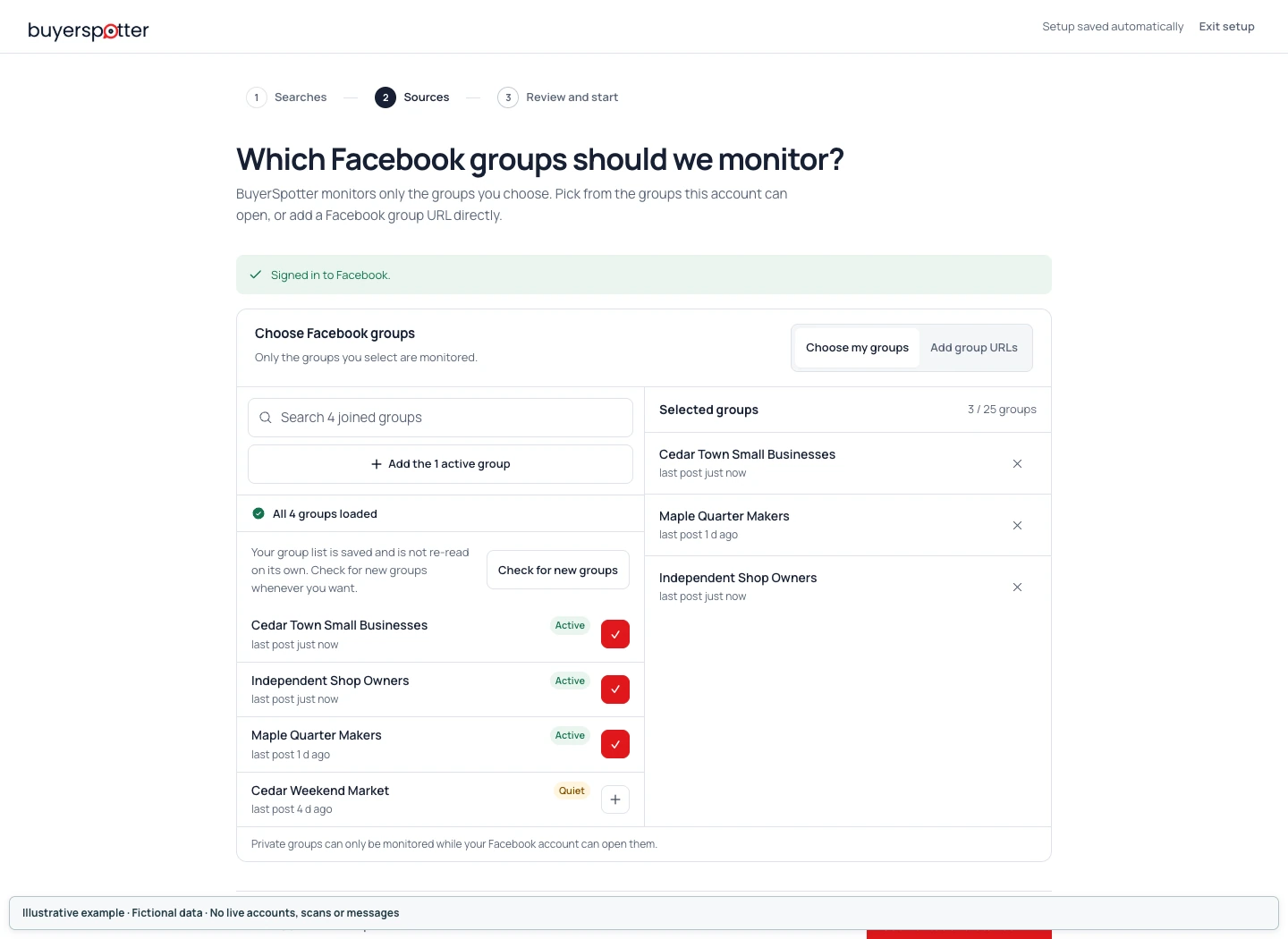
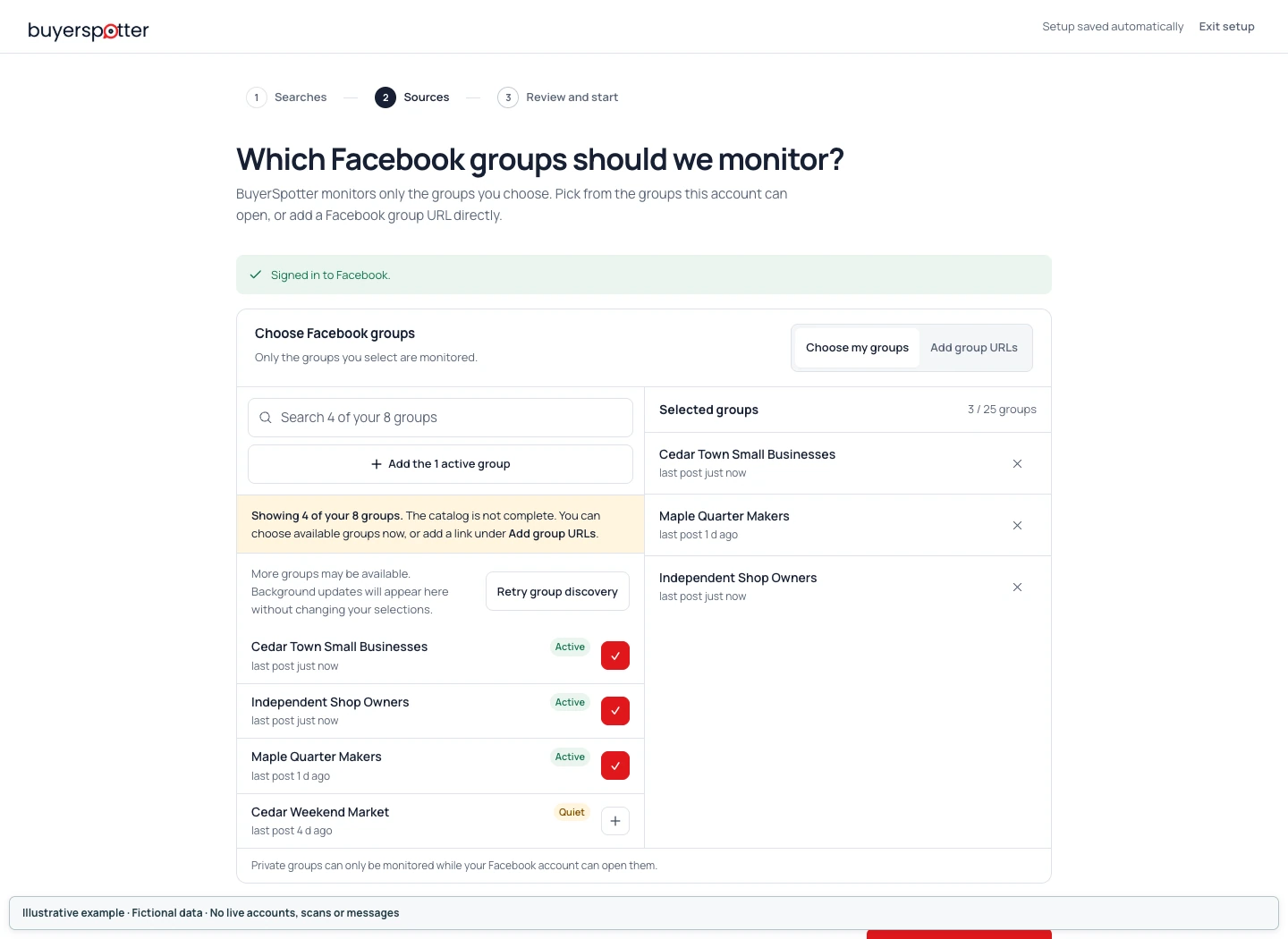
Open Facebook in the same Chrome profile and check that you are signed in. In Facebook groups, review the available groups and select the ones relevant to your offer. The limit is 25 groups; you do not need to fill it. Group activity helps you compare sources, but it does not predict how many useful requests a scan will find.
 Enlarge screenshot
 The Facebook group list is incomplete
If group discovery is partial or interrupted, read the message beside the group list and check Facebook sign-in and access. An incomplete list does not mean your account has no other groups. Keep track of the groups already selected, and use the link entry for a missing group you can open yourself.
 Enlarge screenshot
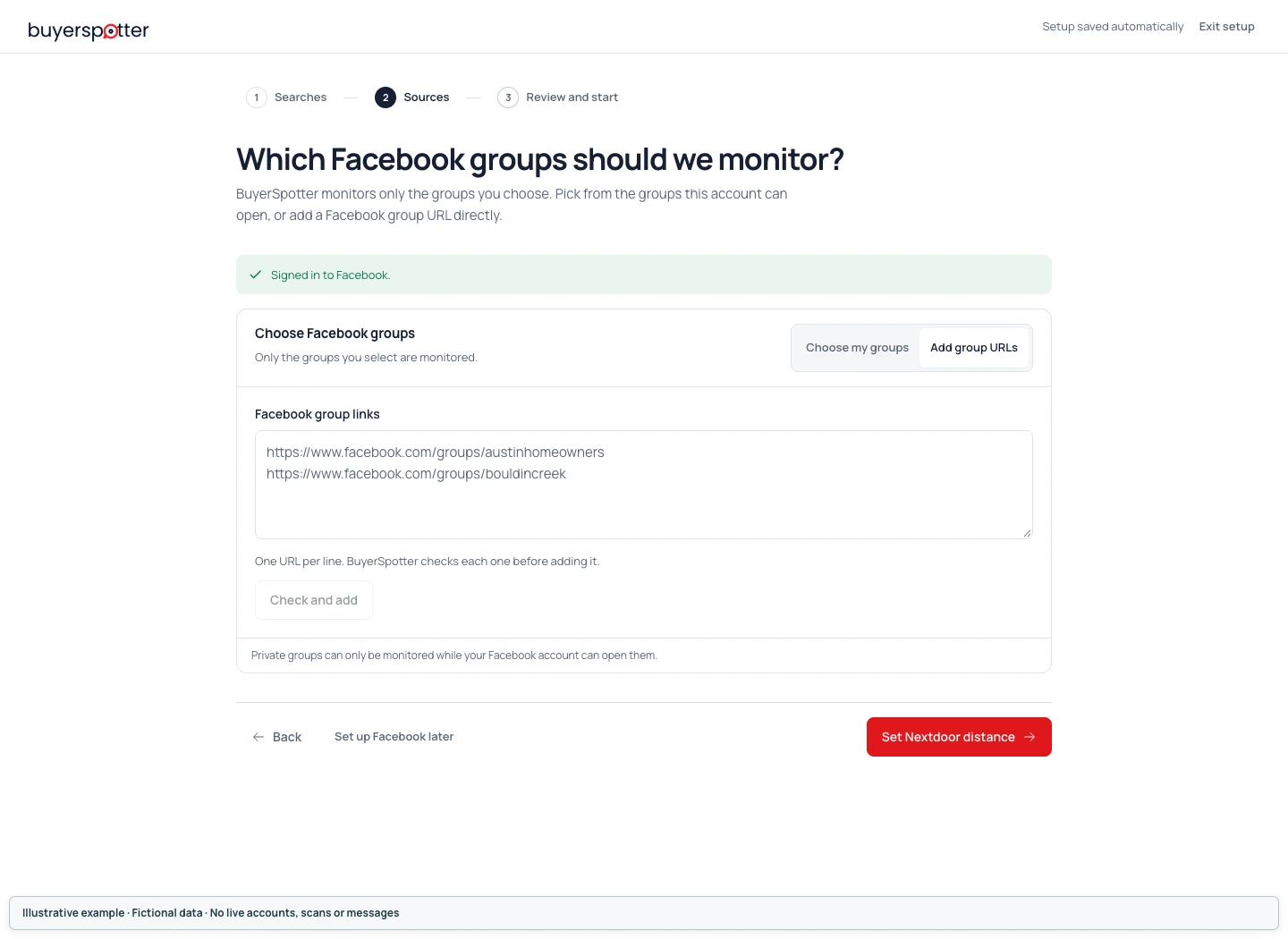
 Add a Facebook group by its link
If a group you can access is missing from the list, use the group-link entry in the picker. Paste a Facebook group URL and review the result. Pending live access check is not confirmation that the group can be read. A duplicate, invalid link, sign-in problem or group limit needs attention before you rely on that source.
 Enlarge screenshot
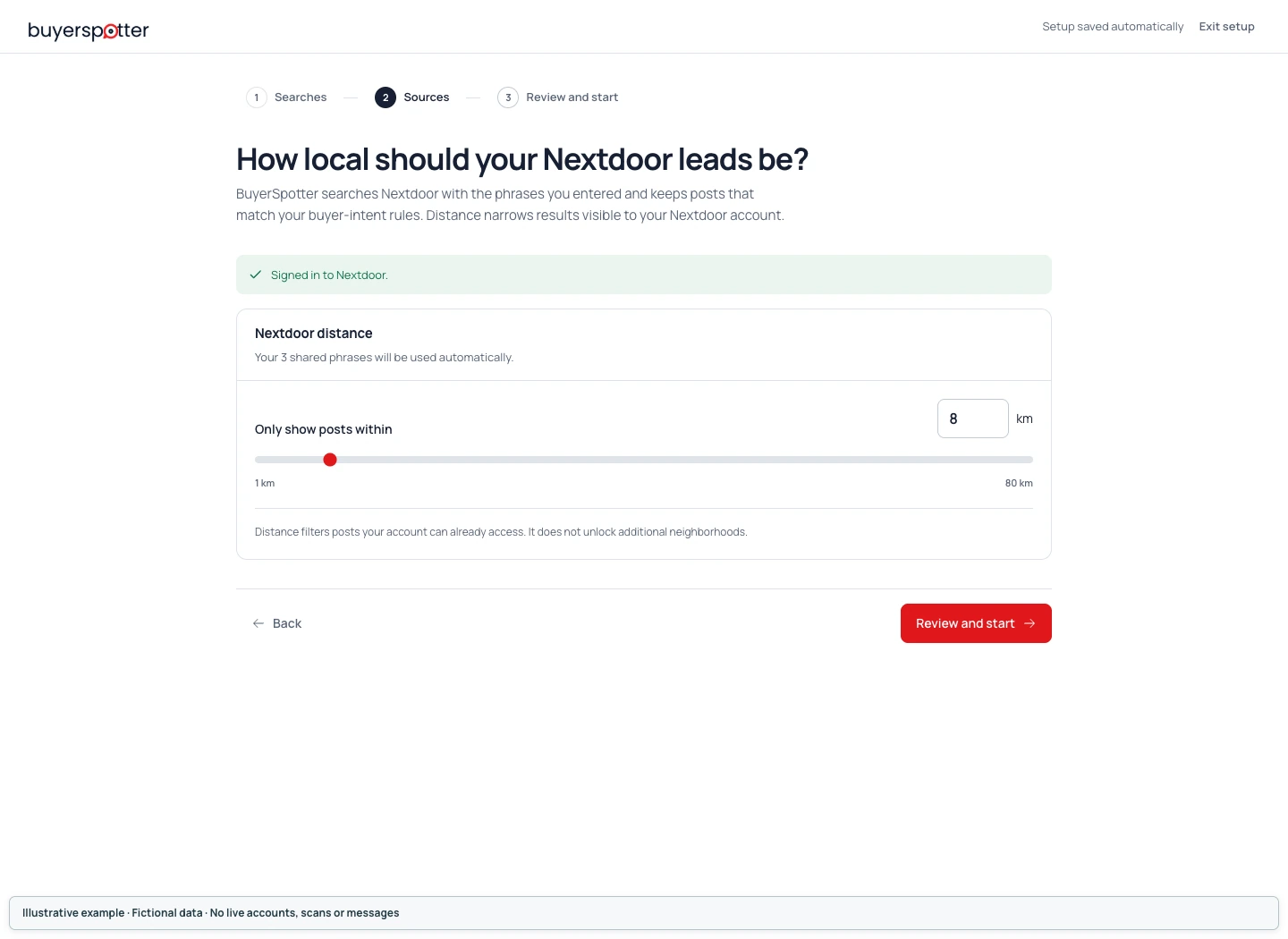
 How to set your Nextdoor search distance
On Nextdoor distance, choose a distance from 1 to 80 km. BuyerSpotter searches with your same phrases; distance narrows the results available to your Nextdoor account. It does not unlock another neighborhood or turn a radius into a search without keywords.
 Enlarge screenshot
 How LinkedIn and X use your search phrases
There is no group list to fill in for LinkedIn or X. Sign into the networks in Chrome. BuyerSpotter checks the available session and uses your shared phrases. Grant the Chrome permission shown when you intentionally enable a source; permission alone does not establish that the network session is signed in.
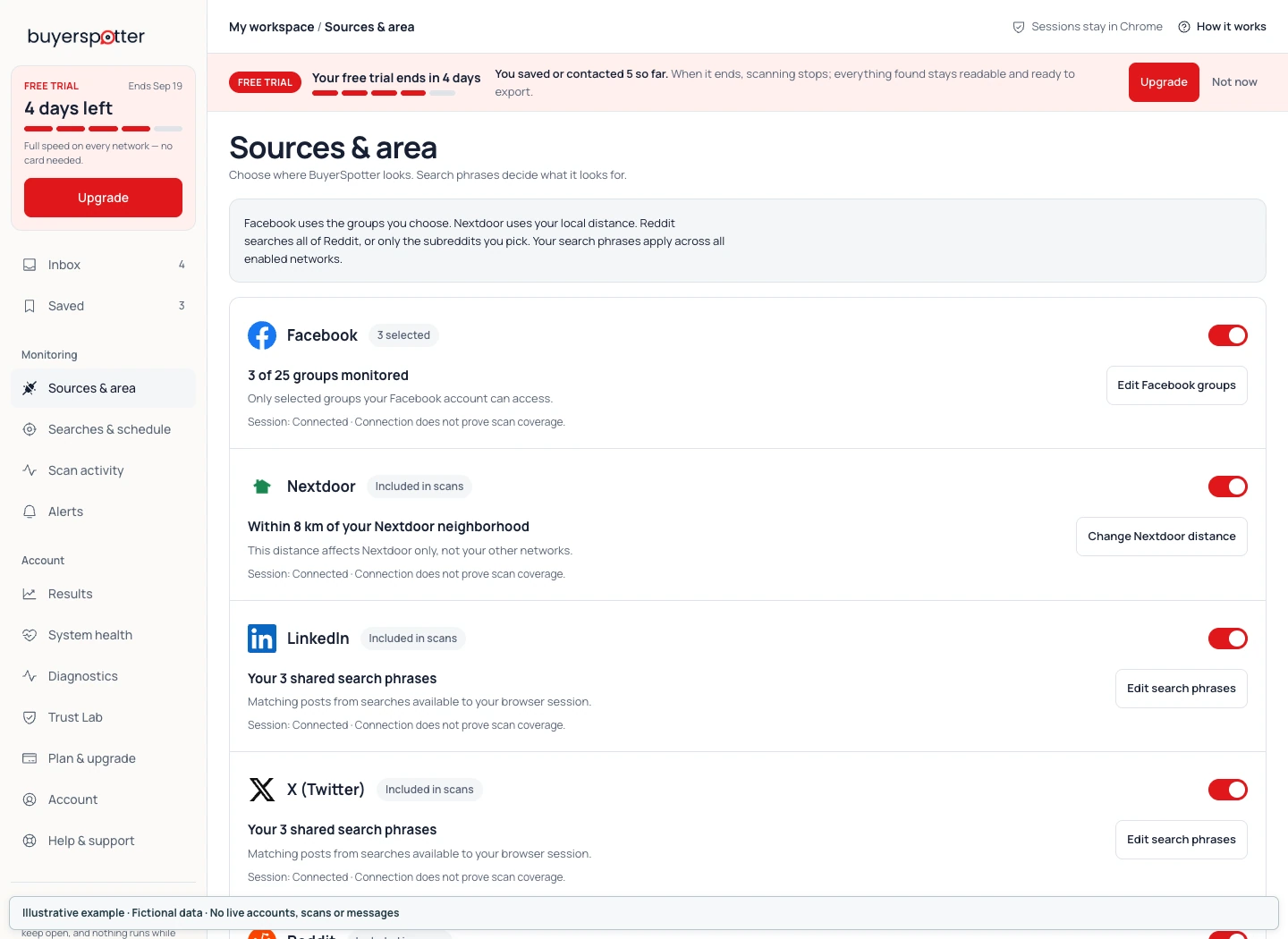
Change sources after setup
Open Sources & area in the sidebar to review network access and open either editor.
 Enlarge screenshot
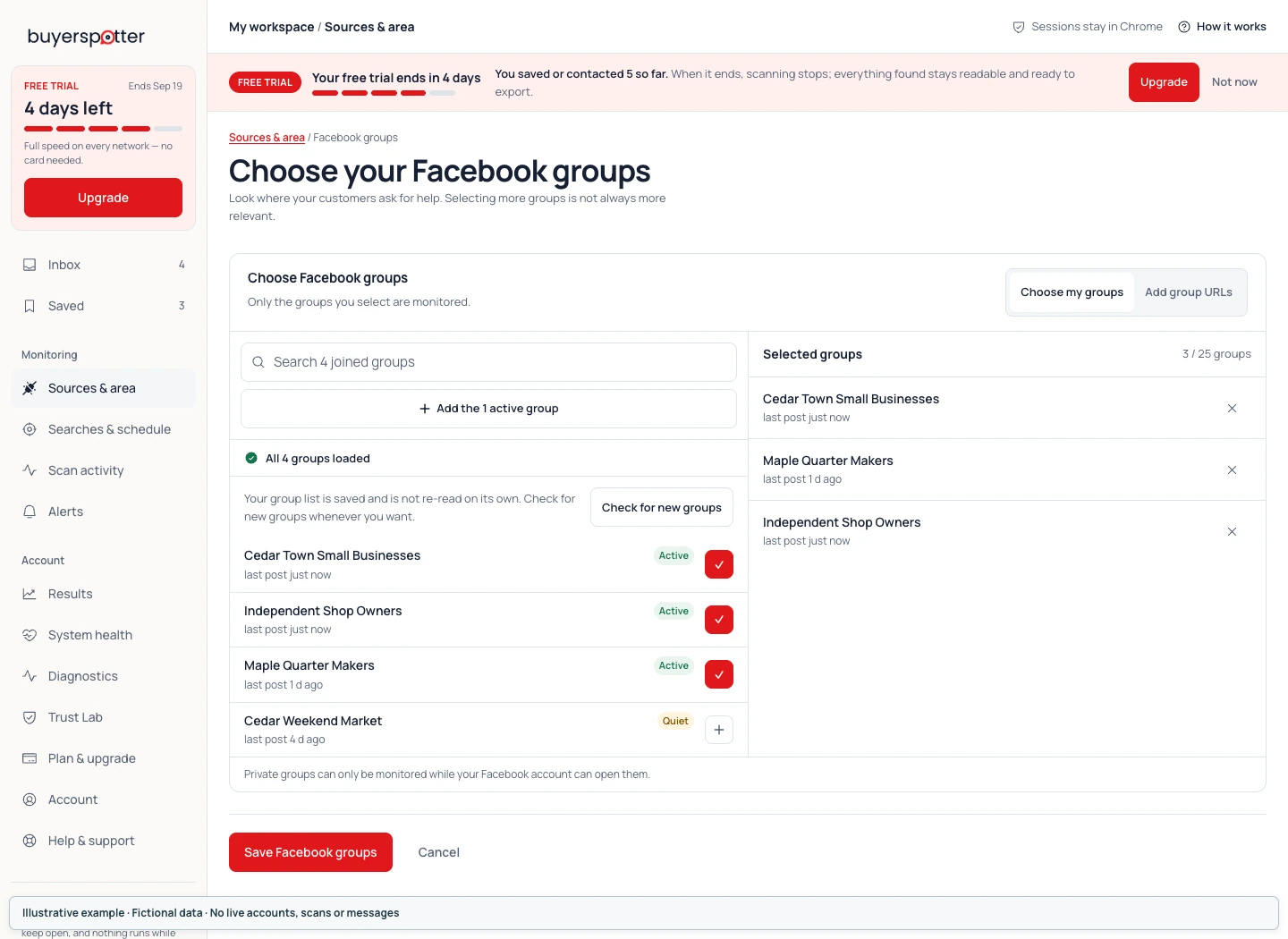
 Edit Facebook groups
Choose Edit Facebook groups, adjust the selected groups, then choose Save Facebook groups. Cancel leaves the saved selection unchanged. Wait for confirmation that the groups were saved.
 Enlarge screenshot
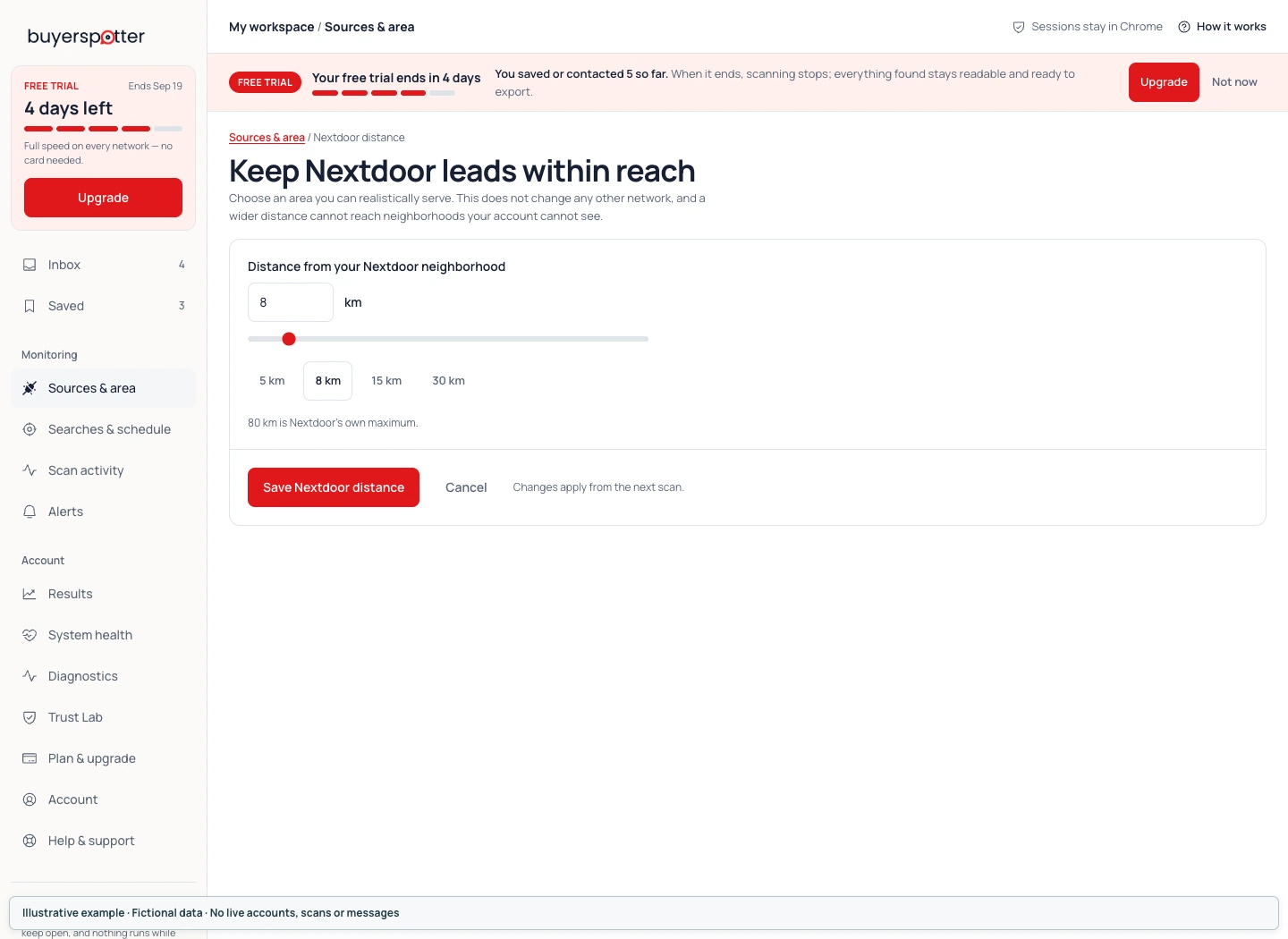
 Change Nextdoor distance
Choose Change Nextdoor distance, set the distance, then choose Save Nextdoor distance. This setting affects Nextdoor only, not Facebook, LinkedIn or X.
 Enlarge screenshot
 Inspect the next scan after saving. Changing a source setting does not prove that a check of the new scope has completed.
Chapter 4
Run your first scan and check its status
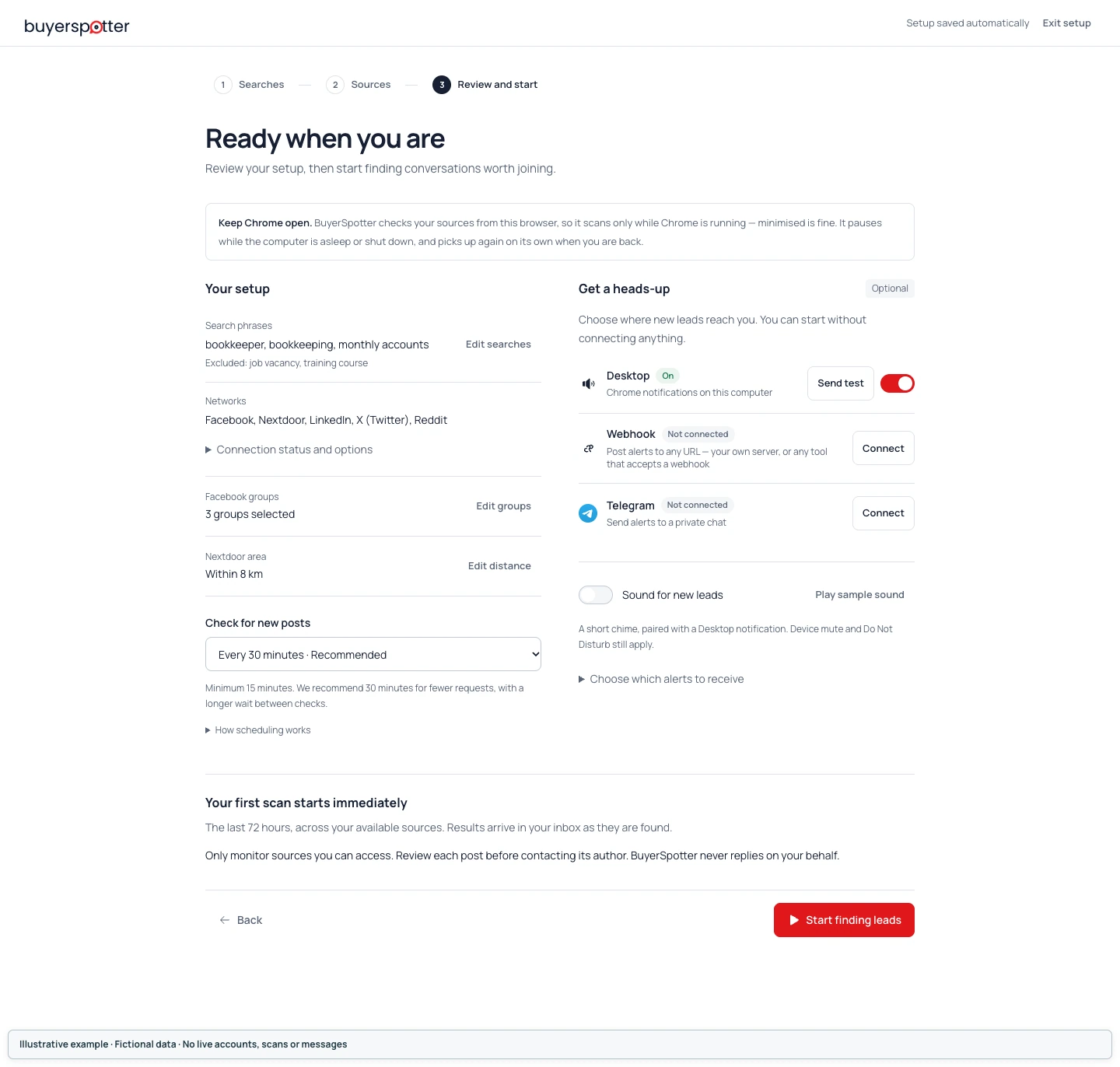
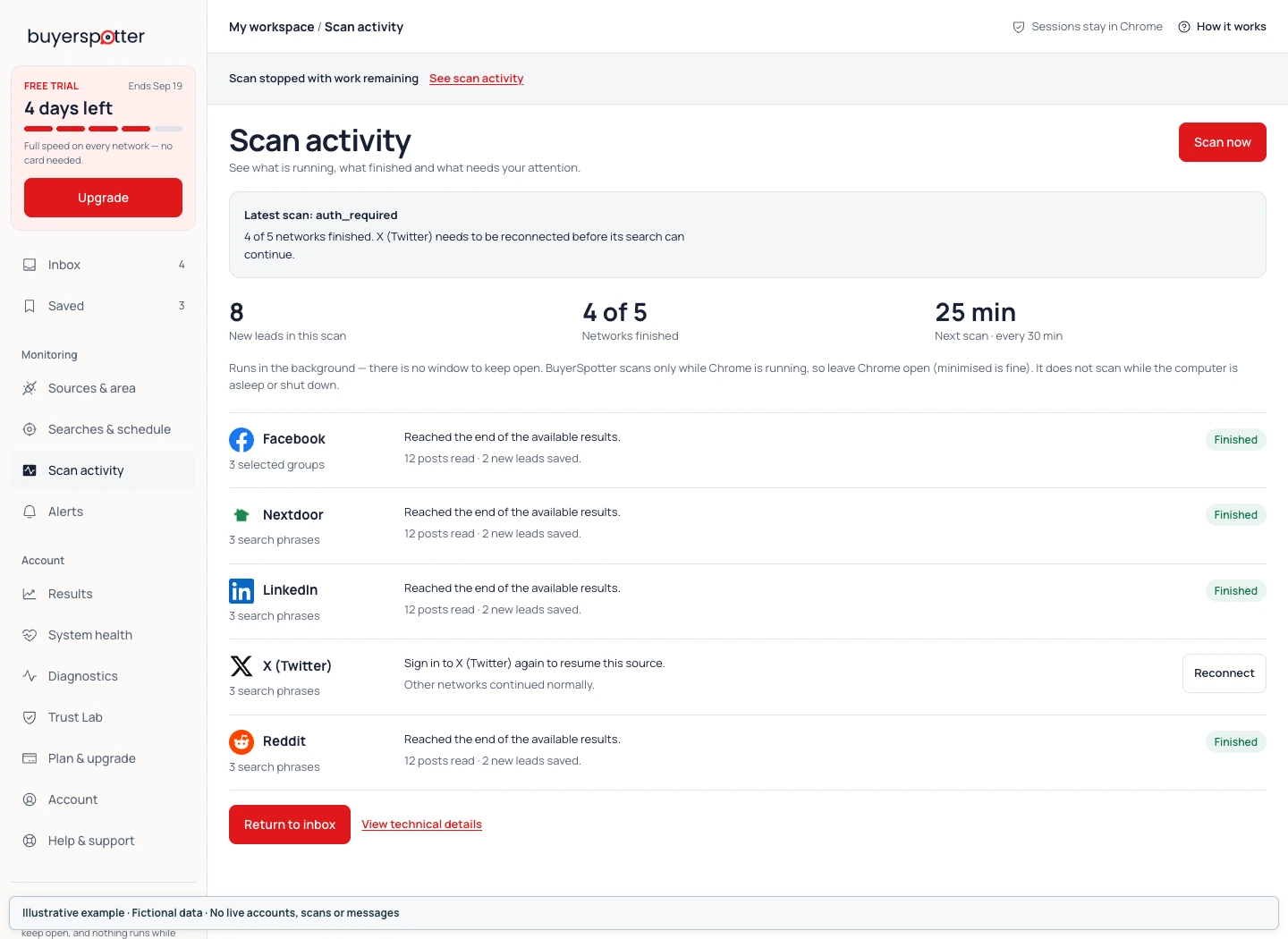
Check your choices on Review and start, then select Start finding leads. Open Scan activity to see which networks finished. Matches can appear before all sources finish, so an Inbox count alone does not confirm a completed scan.
On Review and start, check your phrase list, exclusions, enabled networks, selected groups and distance. The page also lets you choose the scan interval and optional alerts. You can leave alerts off and read matches in the Inbox.
 Enlarge screenshot
 The first scan looks back over a bounded 72-hour window in available sources. A completed scan applies to that selected scope, not the entire network.
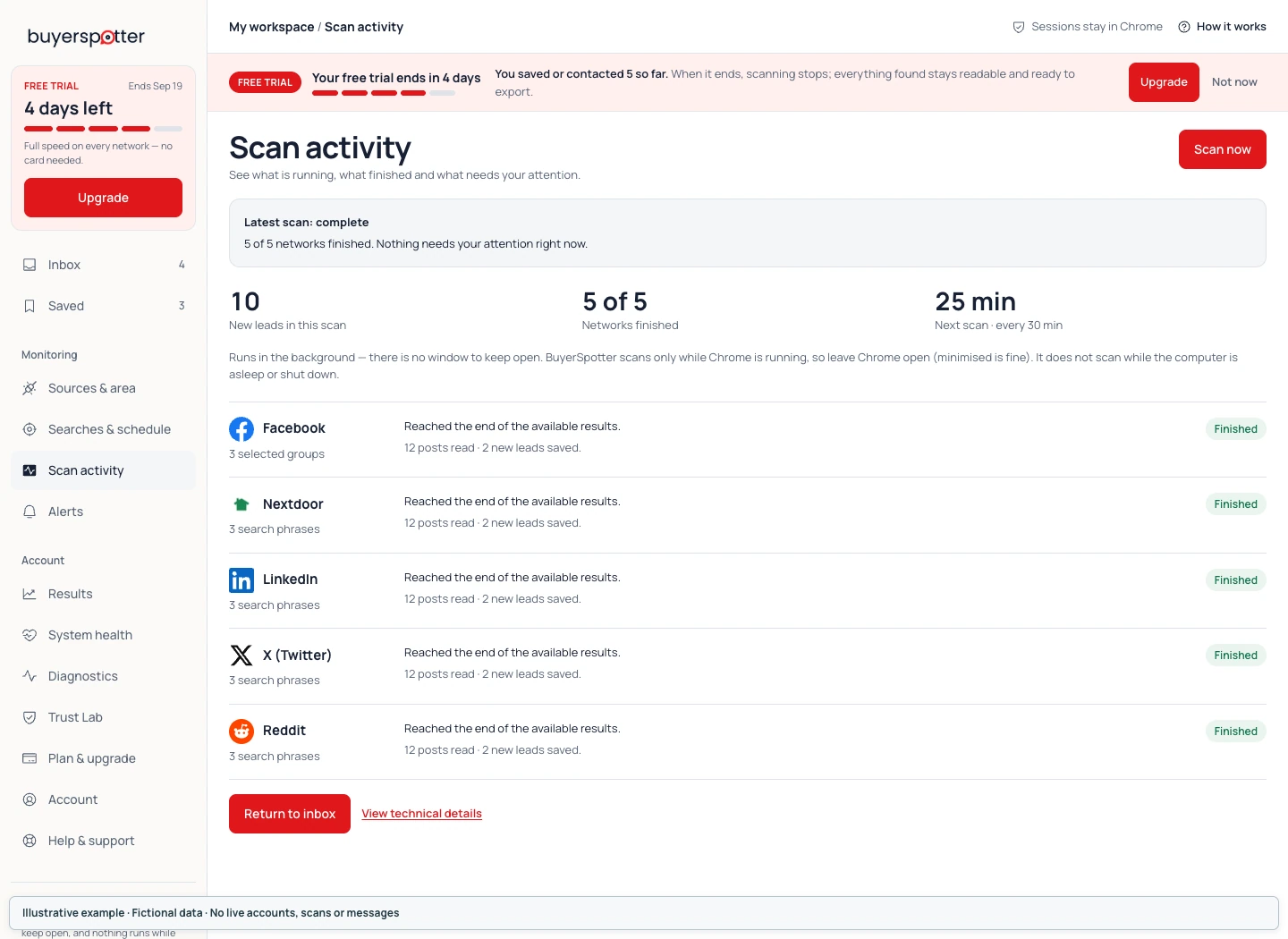
Open Scan activity. Use Scan now for a manual check when it is available. Read Latest scan, Networks finished and the individual source states, rather than relying on the Inbox count.
 Enlarge screenshot
 | What you see | What to do |
|---|---|
| Completed with matches | Open the matches and check the original posts. Completion applies to that selected scan scope. |
| Completed with no matches | Compare your phrases with a small sample directly at the source. Check exclusions before widening the search. |
| Partial, skipped or waiting to resume | Read which source did not finish and the reason shown. Existing matches do not make the remaining work complete. |
| Sign in required or needs attention | Open the affected network, confirm access, then recheck the connection and scan status. |
Read a partial scan
A partial scan can still produce useful matches. Keep those results separate from the sources or time window not yet checked. If the scan says Waiting to resume or Retry scheduled, follow that state; repeatedly pressing Scan now will not fix an expired sign-in.
 Enlarge screenshot
 Chapter 5
Filter and review leads in the Inbox
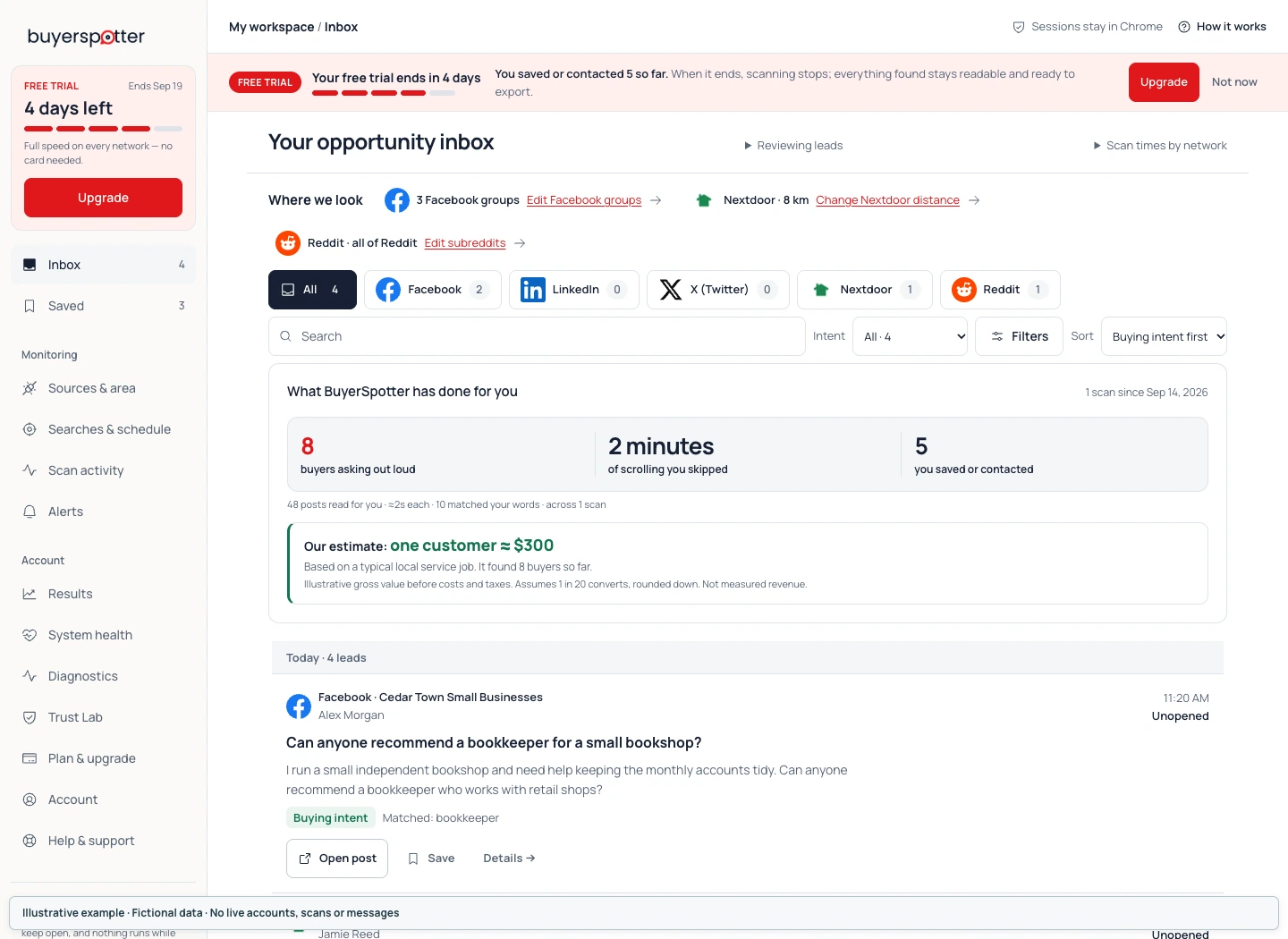
Use the Inbox filters to narrow stored matches by network, text or intent. Open a result to read why it matched, then open the original post to check the conversation. A matching phrase or intent label does not verify a buyer.
A matching word can appear in a recommendation request, an advertisement or a discussion that is already resolved. Read the text before treating a row as a business opportunity.
 Enlarge screenshot
 Use the network filter, text search and intent filter to narrow the visible list. You can sort by Buying intent first or Newest first, and group by Day or Network. These controls organize the matches already in the Inbox; they do not start a new network search.
A recommendation or price question may appear under Questions, not the Buying intent filter. Check All before assuming a request is missing. The alert setting named Only buying-intent posts has separate routing rules.
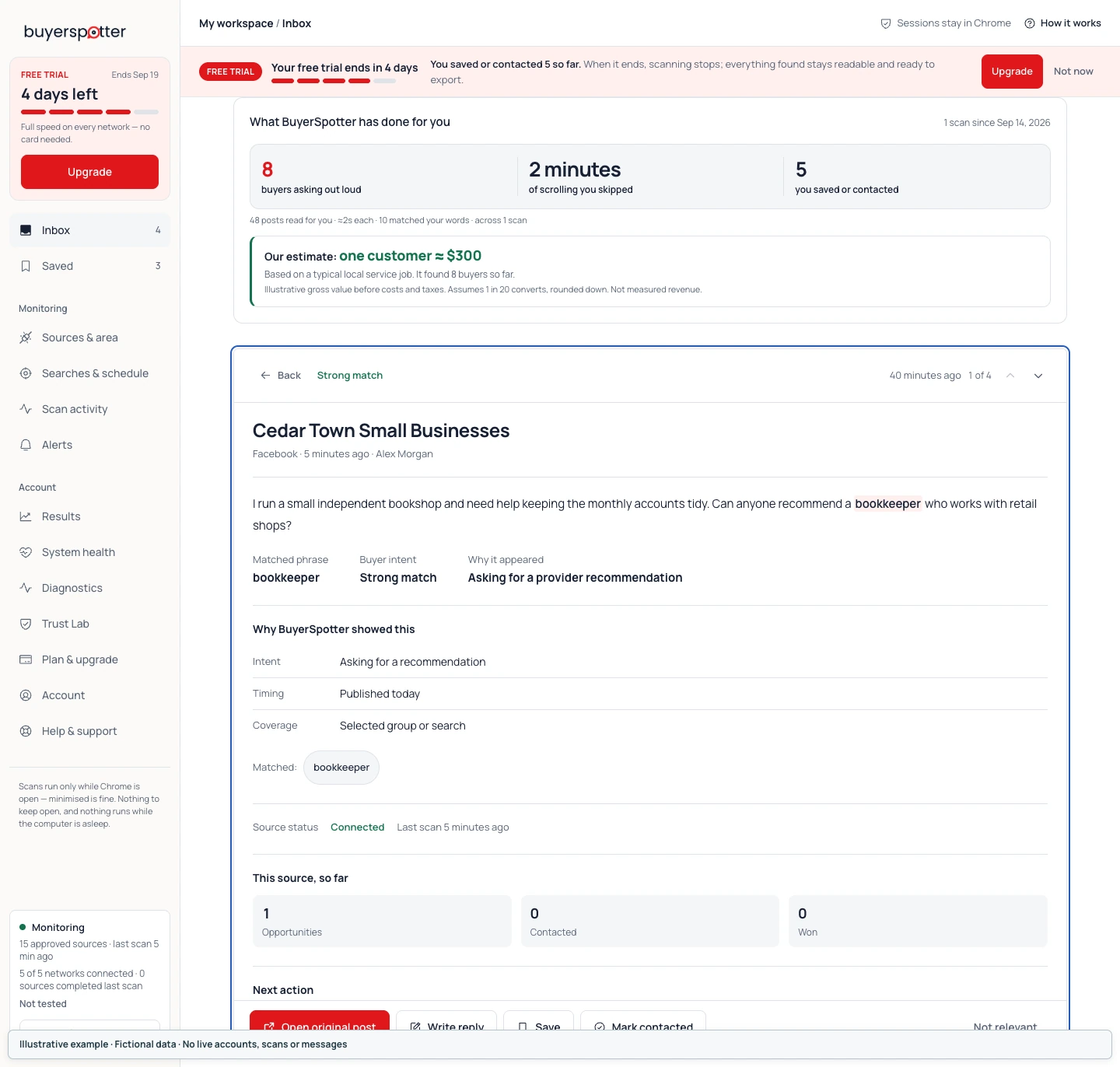
Open a result and check its evidence
- Select the request to read its detail.
- Check the source, post timing, matched phrases and match reason. Read the Intent, Timing and Coverage evidence in context.
- Choose Open original post. Read current replies and any updated information before deciding whether you can help.
 Enlarge screenshot
 If the source is inaccessible or the post was removed, record that limitation. Do not substitute a cached excerpt for a conversation you have not been able to review.
Back to contentsChapter 6
Save leads, write drafts and follow up
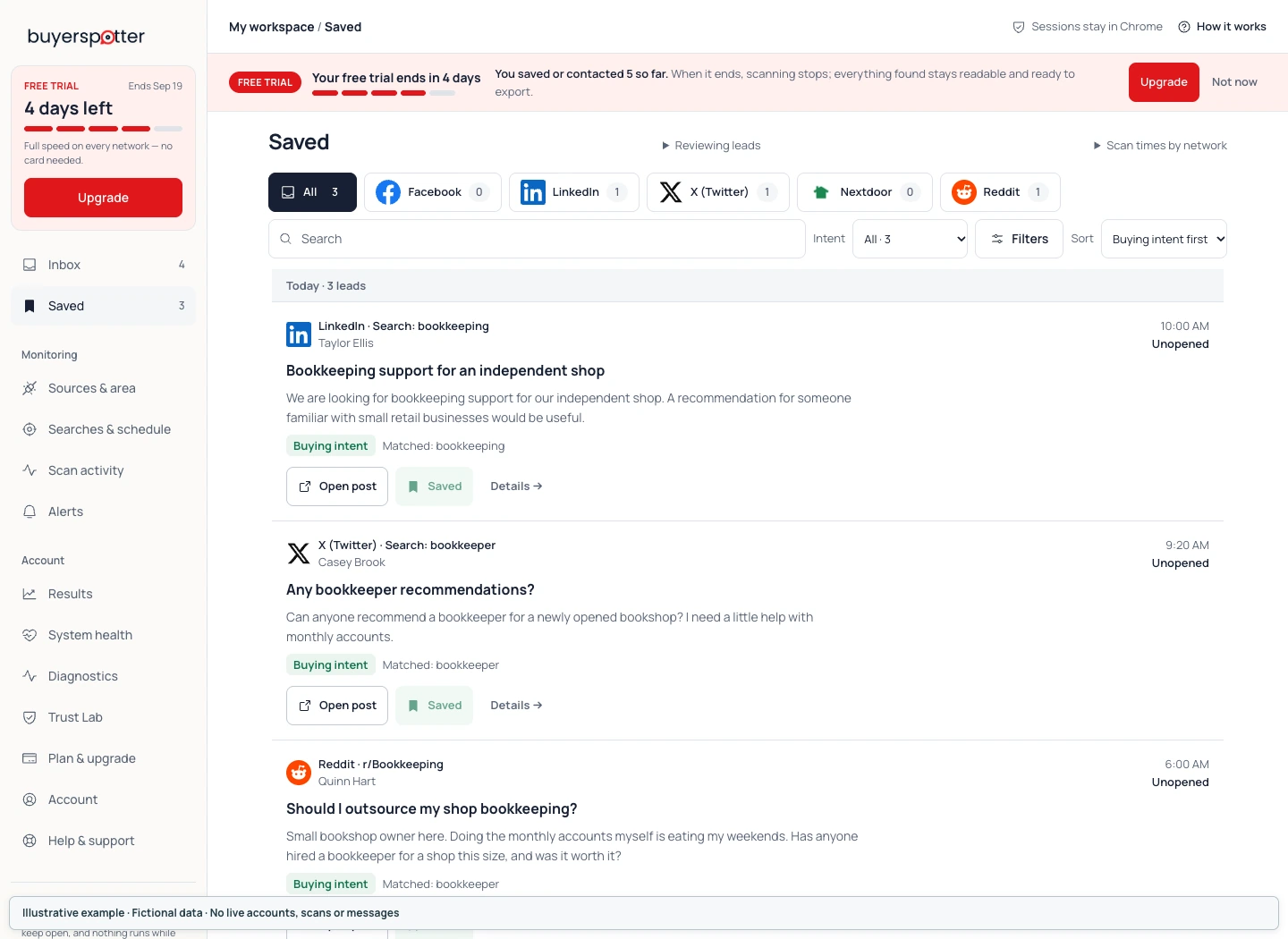
Save a request to revisit it in Saved. Open its details to write a draft, add a private note or set a follow-up reminder. Reply in the original conversation yourself; saving a draft or marking Contacted does not send a message.
Change the status to reflect what you have actually done: Contacted after contacting the person, and Won only after a confirmed outcome. Use Not relevant for a mismatch.
 Enlarge screenshot
 Keep a private note and reminder
In the request detail, add a Private note. Use Follow up for a date and time, then choose Save reminder; without a follow-up time, use Save note. Reminders are local to this browser and appear while Chrome is running or when it next resumes.
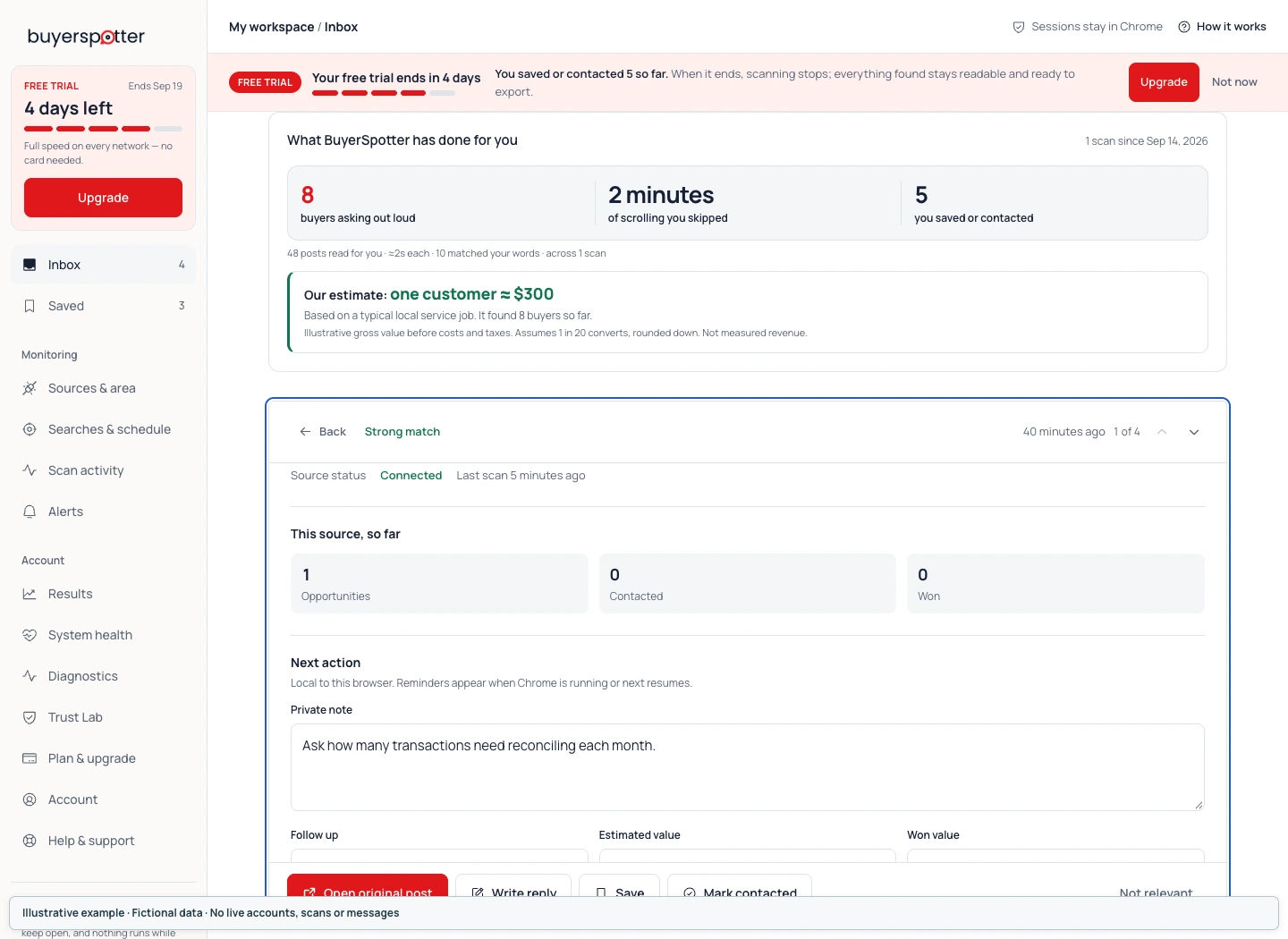 Enlarge screenshot
 The optional Estimated value and Won value fields are your own records. Enter a value only when you have a reason for it. BuyerSpotter does not calculate a reliable deal value from a matching post.
Drafts, reusable templates and relevance feedback
Choose Write reply in the detail panel to open your draft. Write your response and check its save status. Copy draft copies text for you to use manually. Save as template stores wording you can reuse, but every response still needs to fit the current request.
If a result is irrelevant, choose the reason that describes the problem and Save reason. Repeated feedback can support a suggestion in Trust Lab. Review a suggestion before approving it; do not assume feedback silently rewrites your phrase list.
Reply in the original conversation
Check the community rules, disclose your connection to the business you recommend and answer the question that was asked. If a necessary detail is missing, ask for that detail instead of assuming it.
The opportunity checklist can help you separate a confirmed mismatch from information you still need to check.
Back to contentsChapter 7
Edit searches and set the scan interval
Open Searches & schedule, edit your phrases or exclusions, and save the changes for the next scan. The minimum interval is 15, 30 or 45 minutes depending on setup size. Scans need Chrome, an awake computer and access to the selected networks.
Open Searches & schedule to edit your monitor. Use Edit if the fields are not already open. In What you sell, keep a short description of the offer and customer you want to help. The description is context for your setup; it does not automatically generate or replace the included phrases.
Look for contains the included phrases; Always ignore contains exclusions. Adjust a phrase separately and choose Save changes. The page confirms whether the edit was saved, and the next scan uses the saved settings.
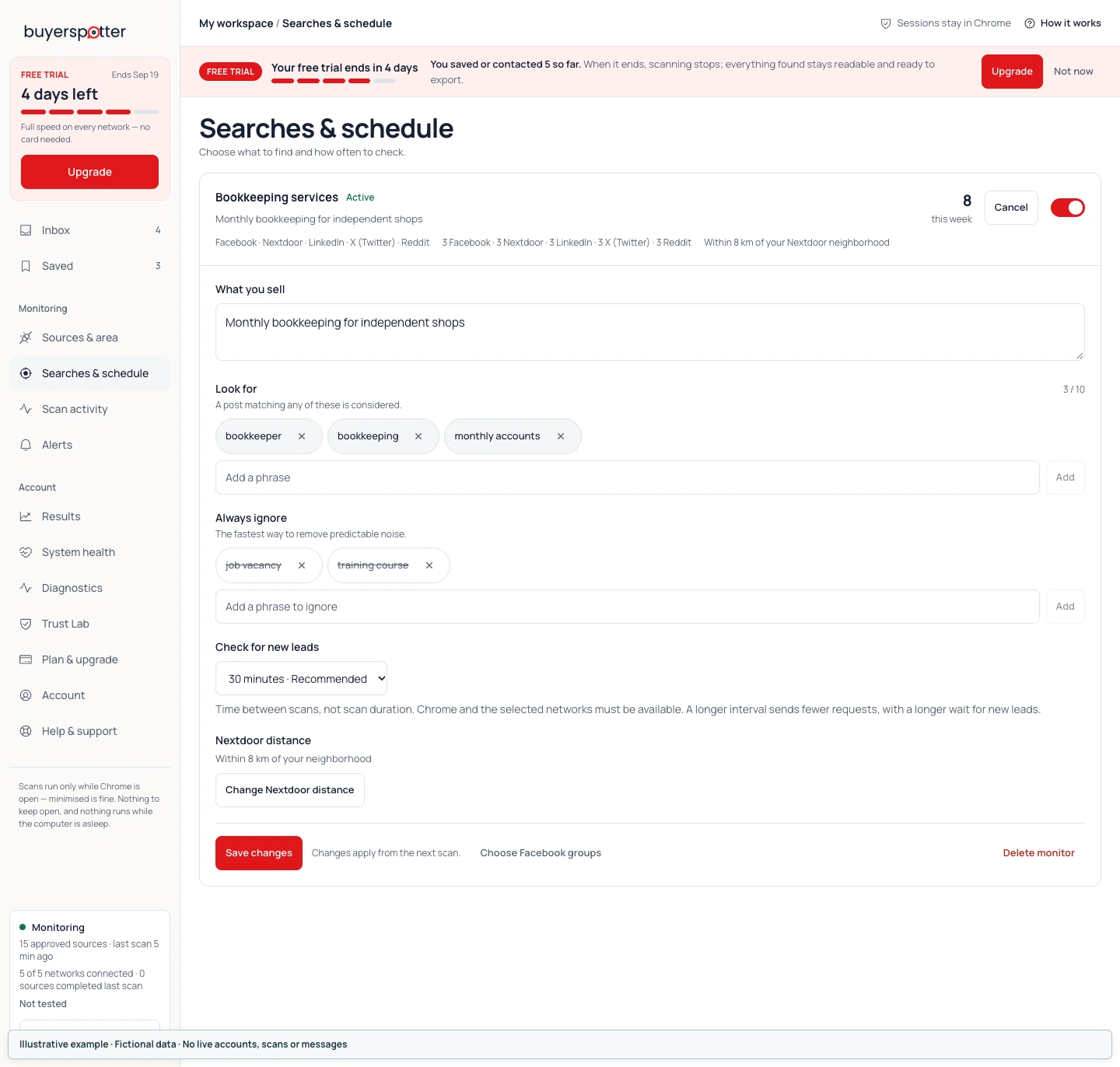 Enlarge screenshot
 How often does BuyerSpotter scan?
The interval choices are 15, 30 or 45 minutes, 1 hour, 3 hours and 6 hours. Check for new leads shows the minimum for your current setup. This is the time between checks, not a promise about how long a scan takes or when an alert will arrive.
| Setup size | Minimum interval |
|---|---|
| Up to 7 Facebook groups and up to 5 phrases | 15 minutes |
| Up to 15 Facebook groups and up to 10 phrases, above the smaller limit | 30 minutes |
| More than 15 Facebook groups, within the 25-group and 10-phrase limits | 45 minutes |
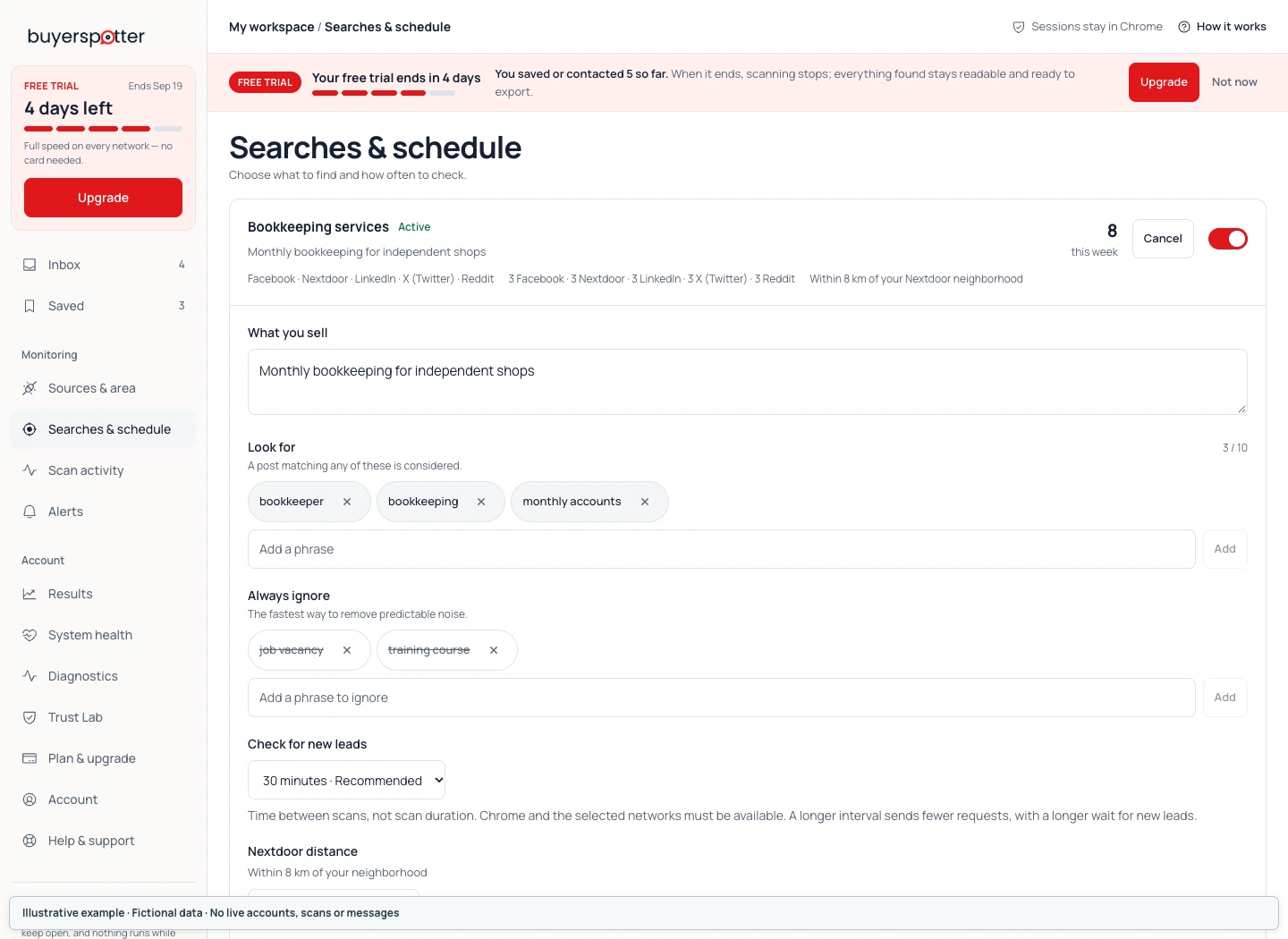 Enlarge screenshot
 For a small setup, the product recommends 30 minutes to make fewer requests. Timing can vary, and Chrome, your computer and the network sessions must remain available. A sleeping computer or interrupted connection can delay the next check.
Pause or remove a monitor
Use the monitor switch to change its state between Active and Paused. Confirm the state before leaving the page. Pause when you want to stop scheduled work without changing the search definition.
Delete monitor asks for confirmation. Choose Keep if you only intended to pause. Do not delete a monitor as the first response to a source-access error; inspect Scan activity first.
Refine one thing at a time
Keep one useful request and one misleading match. Change the phrase or source that explains the difference, then compare the next completed checks. If a word describes several unrelated services, make it more specific. If real requests use a different term, add that wording instead of filling the list with guessed synonyms.
Back to contentsChapter 8
Set up Telegram, desktop and webhook alerts
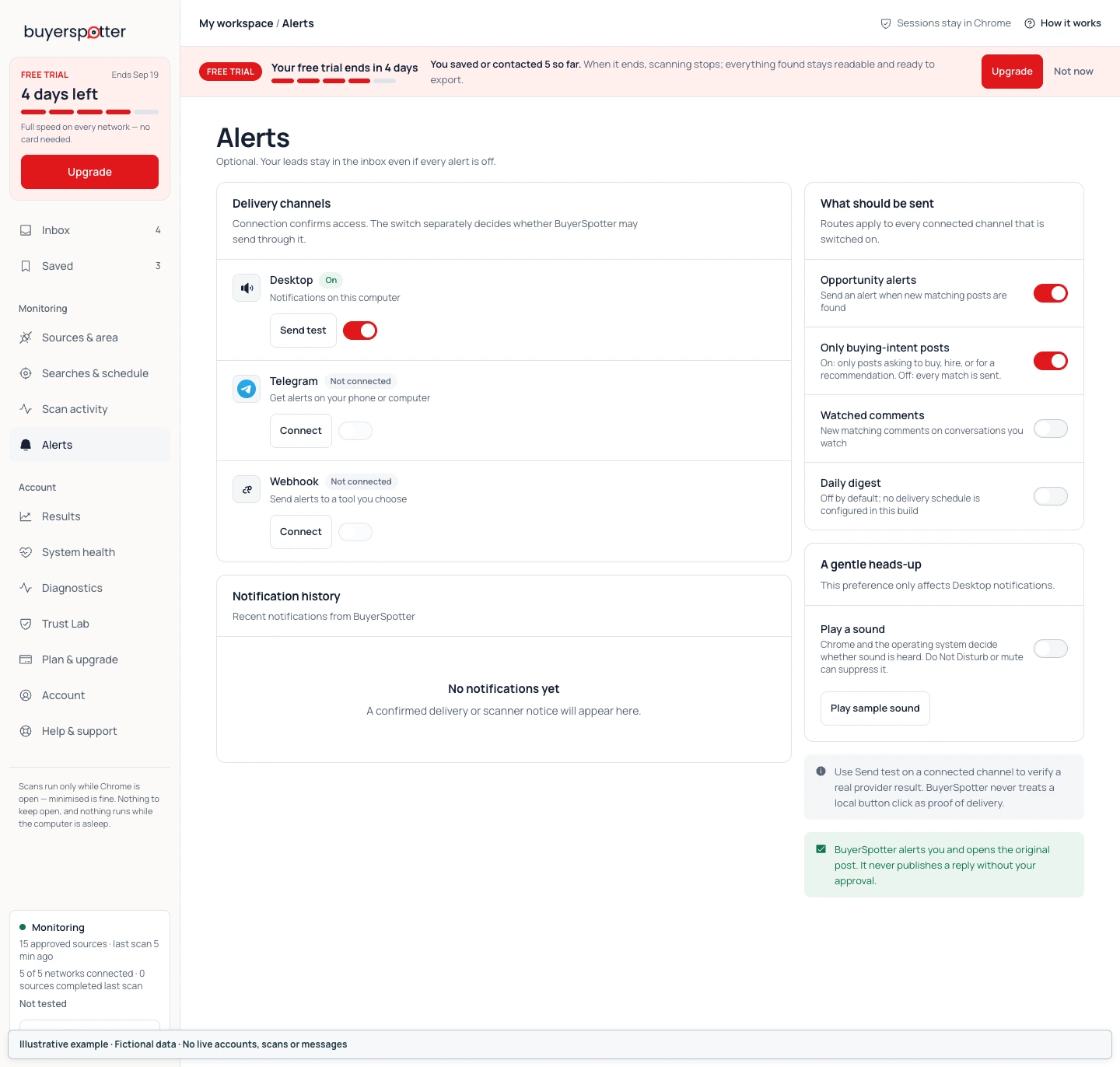
Open Alerts, connect Desktop, Telegram or Webhook, then switch the channel On. Choose Send test when no scan is running and check receipt at the destination. Connected, enabled and delivered are separate states; alerts are optional.
Matching posts stay in the Inbox even when every alert channel is off. Jump to the connection steps for desktop notifications, Telegram or webhooks and Slack destinations.
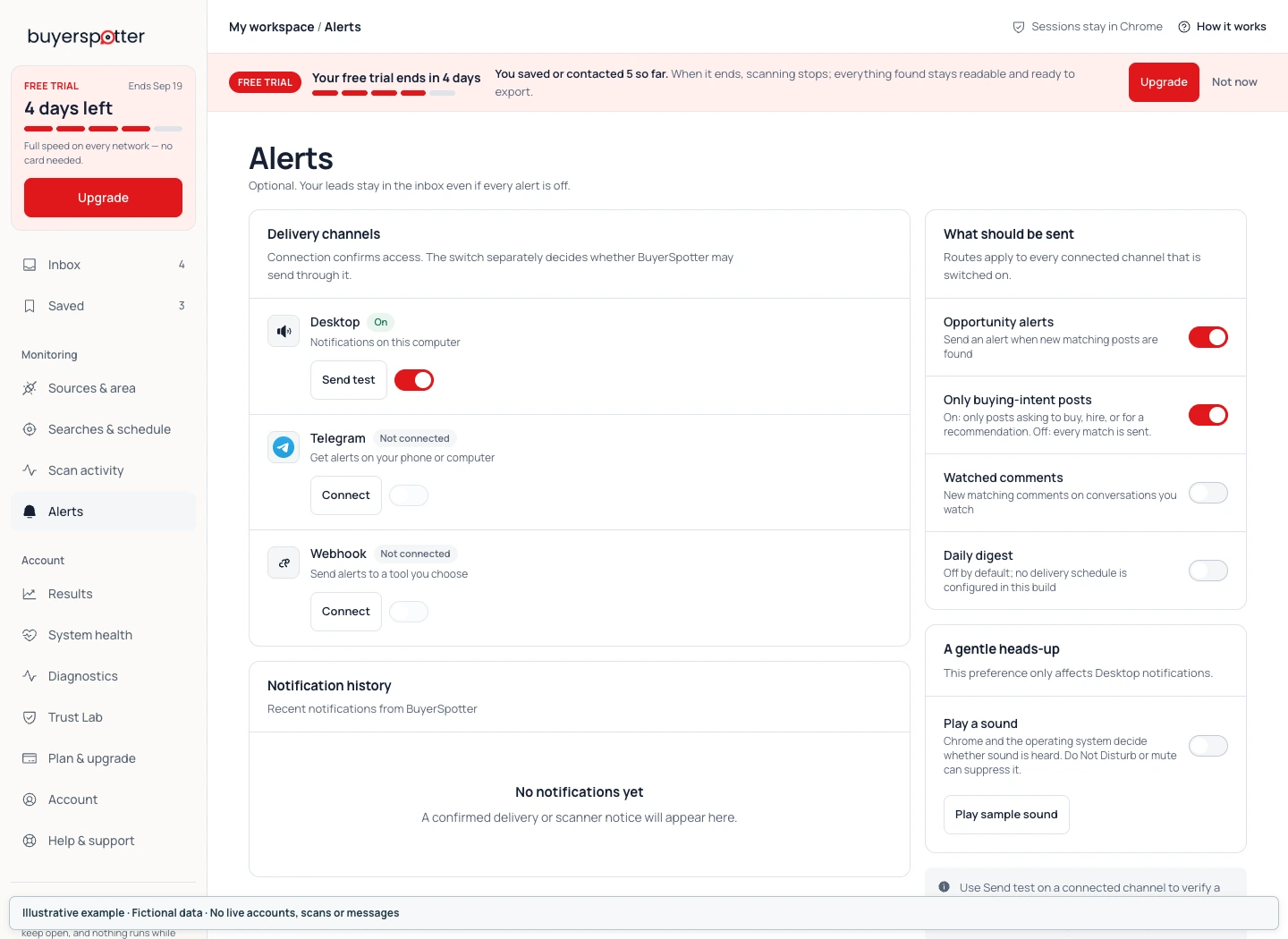 Enlarge screenshot
 How to enable desktop notifications and check sound
Choose Check access for Desktop and follow Chrome's permission prompt if shown. Once connected, switch the channel On and use Send test. Check both the reported result and the notification on your computer. Device mute and Do Not Disturb can suppress sounds.
How to connect Telegram on your computer or phone
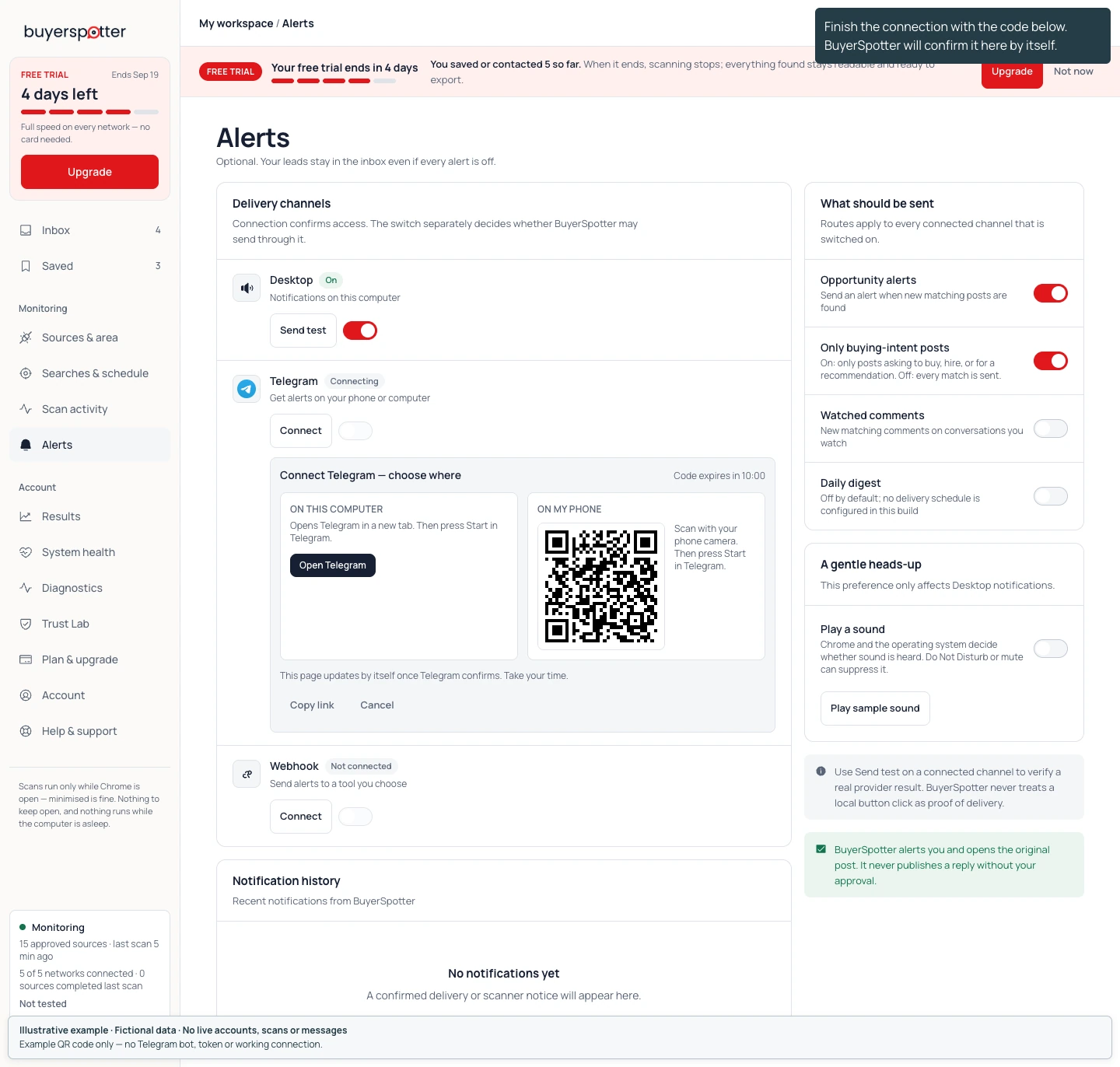
- Choose Connect for Telegram. The handoff gives you a choice of device.
- On your computer, choose Open Telegram under On this computer. On your phone, scan the QR code under On my phone with your phone camera.
- Press Start in Telegram. Opening the link or scanning the code alone does not complete the connection.
- Return to BuyerSpotter. The panel updates when Telegram confirms; check that the channel shows Connected.
- Switch it On, choose Send test when no scan is running, and confirm that the message reached the intended chat.
The code lasts 10 minutes. If it expires, choose Get a new code and follow the new link or QR code. Copy link lets you move the current link to your device; Cancel closes the handoff without completing it.
 Enlarge screenshot
 Connect a Telegram group instead of a private chat
Use the add the bot link in your current connection panel to add the bot to the group you intend to use. Then send the displayed /connect <your current code> command in that group. Use the panel's Copy button for the exact command.
The code still expires after 10 minutes. Return to BuyerSpotter, check the connected destination and switch the channel On, then verify Send test in that group. The screenshot contains example data: do not use its code or QR image to connect your account.
How to connect a webhook, including a Slack destination
Use Webhook when you have an HTTPS endpoint ready to receive a JSON message for each alert. Enter it under Where should alerts be posted? and choose Save. BuyerSpotter does not show the saved URL again.
Configure the receiving service for the BuyerSpotter payload. Slack, Discord, Zapier, Make and custom servers can have different requirements; their names do not mean every endpoint accepts the same JSON format. There is no native Slack OAuth connection in this version.
After the channel connects, switch it On and use Send test. Verify the actual message at the destination. Treat the webhook URL like a credential and leave it out of screenshots and support emails.
 Enlarge screenshot
 Choose which new matches trigger an alert
Under What should be sent, Opportunity alerts enables alerts for new matches. Only buying-intent posts narrows delivery to posts with the relevant request signals. These settings apply to connected channels switched on.
Play sample sound only plays an audio sample; it does not send a notification. Check Notification history for recorded events. Delivery tests are unavailable while a scan is running.
Back to contentsChapter 9
Export leads and manage your account
Open Results to review recorded outcomes or choose Export CSV for a copy of stored leads. Open Plan & upgrade to check scanning access and plan choices. Existing leads remain readable and exportable after trial access expires.
Results: read the totals in context
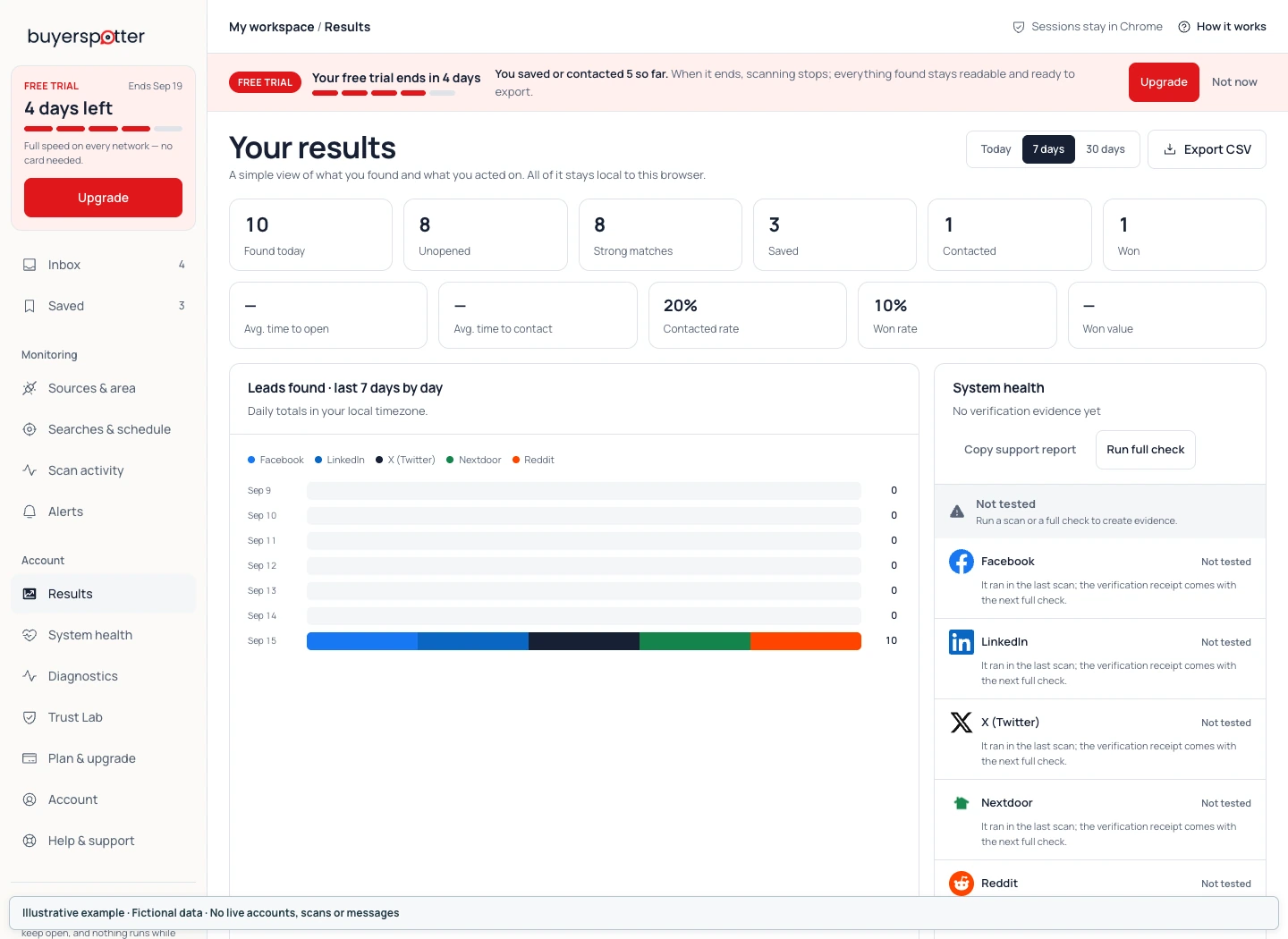
Open Results to review found posts and the actions you recorded over the selected period. Totals such as Saved, Contacted and Won reflect your local workflow. Use them to compare how you work with matches, not to estimate demand across an entire network.
 Enlarge screenshot
 A contact rate is not a response rate, and a strong-match count is not a sales forecast. Any value you enter belongs to your own record; it is not an independently verified revenue figure.
How to export your stored leads to CSV
On Results, choose Export CSV beside the date-range controls and check that the file downloaded. The export contains stored leads, not only the date range selected for the charts. Exporting does not delete your records or send a message to anyone.
If export fails, read the error and try again; do not assume a file was saved because you clicked the button. The CSV can contain post and workflow information. Store and share it only where appropriate for that data.
Plan & upgrade
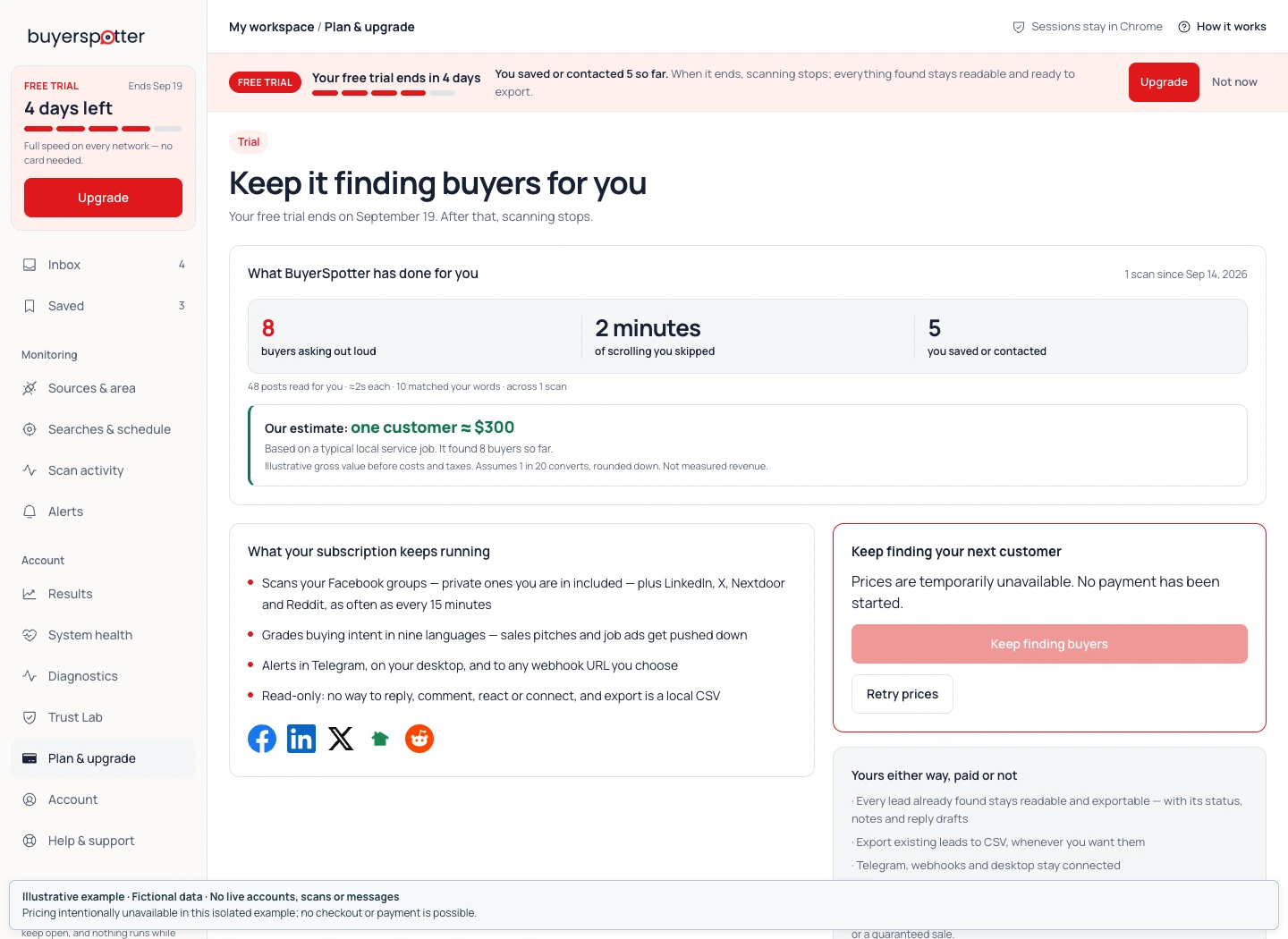
Open Plan & upgrade to inspect your access state and available plan choices. Check the actual price, billing interval and taxes at checkout before paying. The pricing page explains plan limits; your billing page is the place to manage a paid subscription.
 Enlarge screenshot
 Account, sign-out and local records
Open Account to check which BuyerSpotter account is signed in. Use Sign out when that is the action you intend. It is separate from signing out of Facebook, LinkedIn, X or Nextdoor.
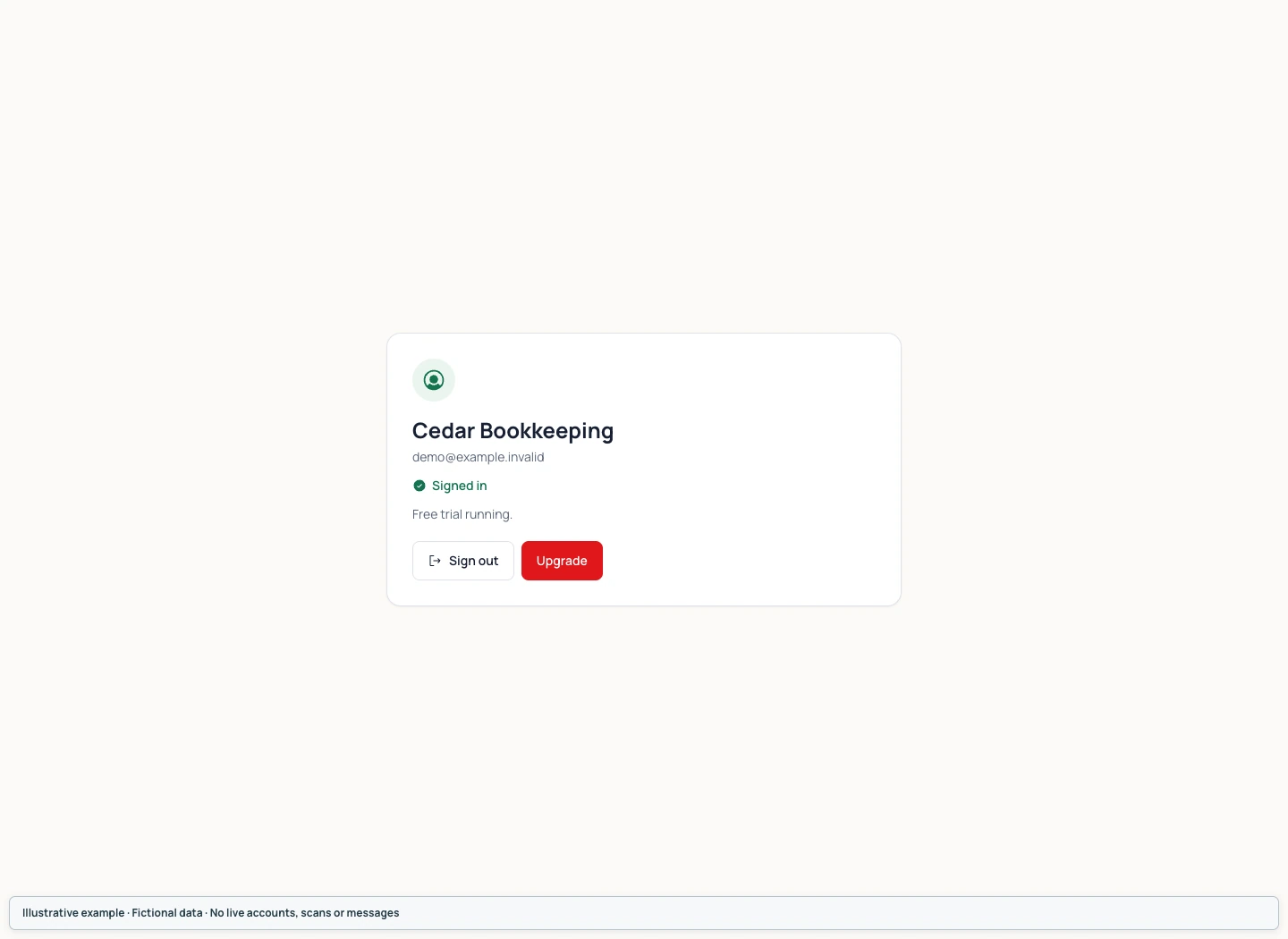 Enlarge screenshot
 The plan includes two active installations, but their Inboxes and local settings do not synchronize. Removing an extension installation can remove its stored matches, notes and drafts. Uninstalling also does not cancel a paid subscription: manage future renewals on the billing page.
For a billing question, contact hello@buyerspotter.com with the purchase email and order reference. Never send card details. See the refund policy for refund terms.
Back to contentsChapter 10
Troubleshoot missing groups, scans and alerts
Check Sources & area for network access, Scan activity for incomplete checks, and Alerts for delivery problems. Keep your settings while investigating. If the issue persists, copy the report from Help & support and include the error and time; avoid reinstalling as a first step.
Removing the extension can delete local matches, notes and drafts. Use the checks below before considering a reinstall.
| Problem | Next check |
|---|---|
| A network is disconnected | Open it in the same Chrome profile, confirm sign-in and source access, then recheck Sources & area. |
| A group link stays pending | Open that exact group yourself. Check the link, current membership and the access-check result. |
| A scan stopped or is partial | Read the source states in Scan activity. Check availability before starting another scan. |
| The Inbox is empty | Confirm the scan completed, inspect filters and exclusions, then compare wording in the original source. |
| Too many unrelated matches | Read the matching phrase. Record a relevance reason and refine one phrase or source at a time. |
| No Telegram or webhook alert | Check Connected, On and routing settings separately; Send test and confirm destination receipt. |
| A reminder seems late | Confirm it was saved and that Chrome was running. Local reminders can appear when Chrome resumes. |
Help & support
Open Help & support. Show inbox guidance again reopens the Inbox guidance. For a persistent issue, use Copy support report and email it to hello@buyerspotter.com. Add what you expected, what happened, the affected network and the time with your time zone.
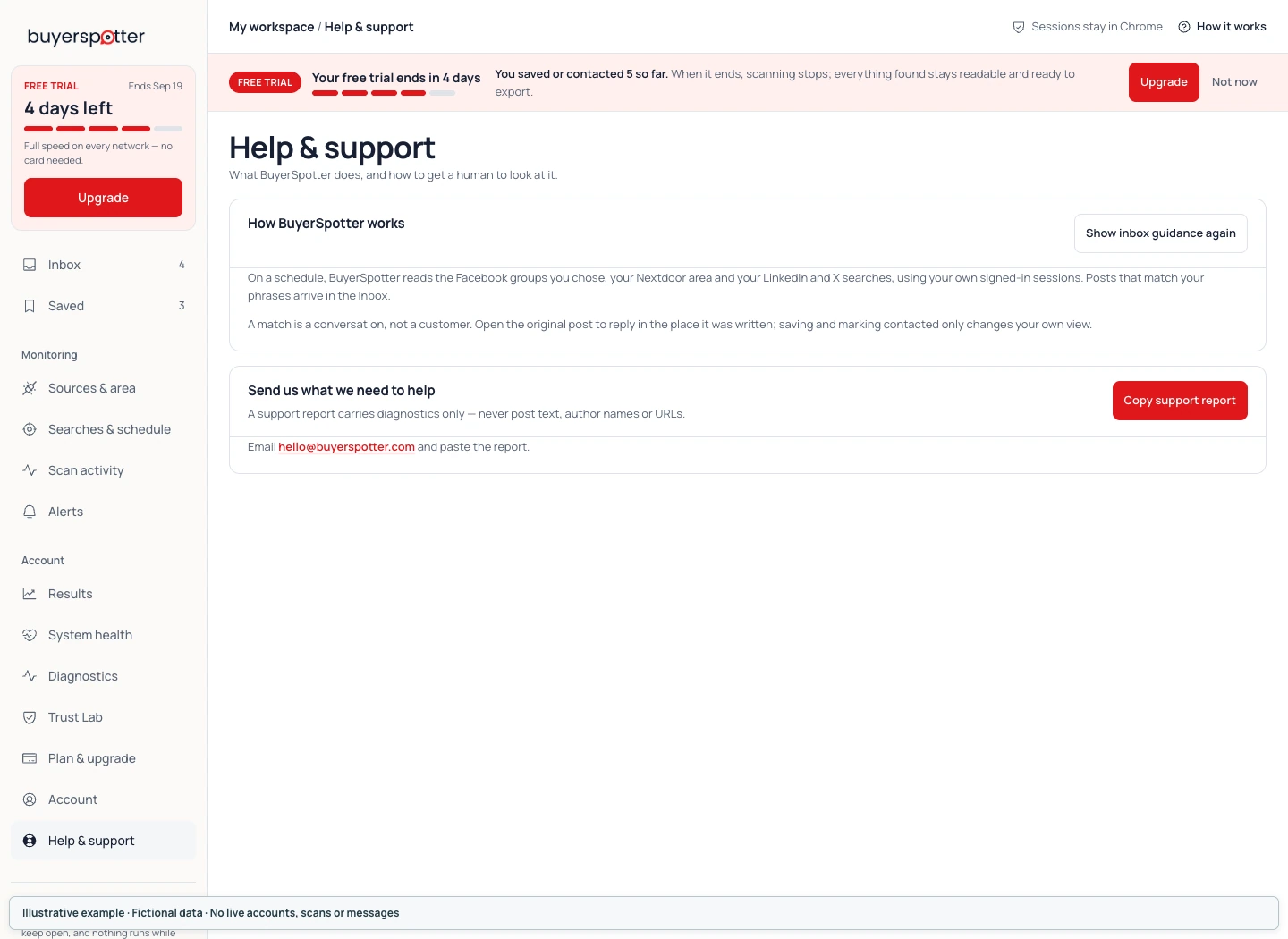 Enlarge screenshot
 The support report is designed for diagnostic information without post text, author names or URLs. Review anything you share and remove passwords, webhook URLs, sign-in codes and unrelated private information from screenshots or extra attachments.
System health: inspect the current state
System health shows checks such as source access, worker activity, storage and sound state. Use the labels and timestamps to understand the current state. A green check for one component does not prove a fresh full scan or alert delivery.
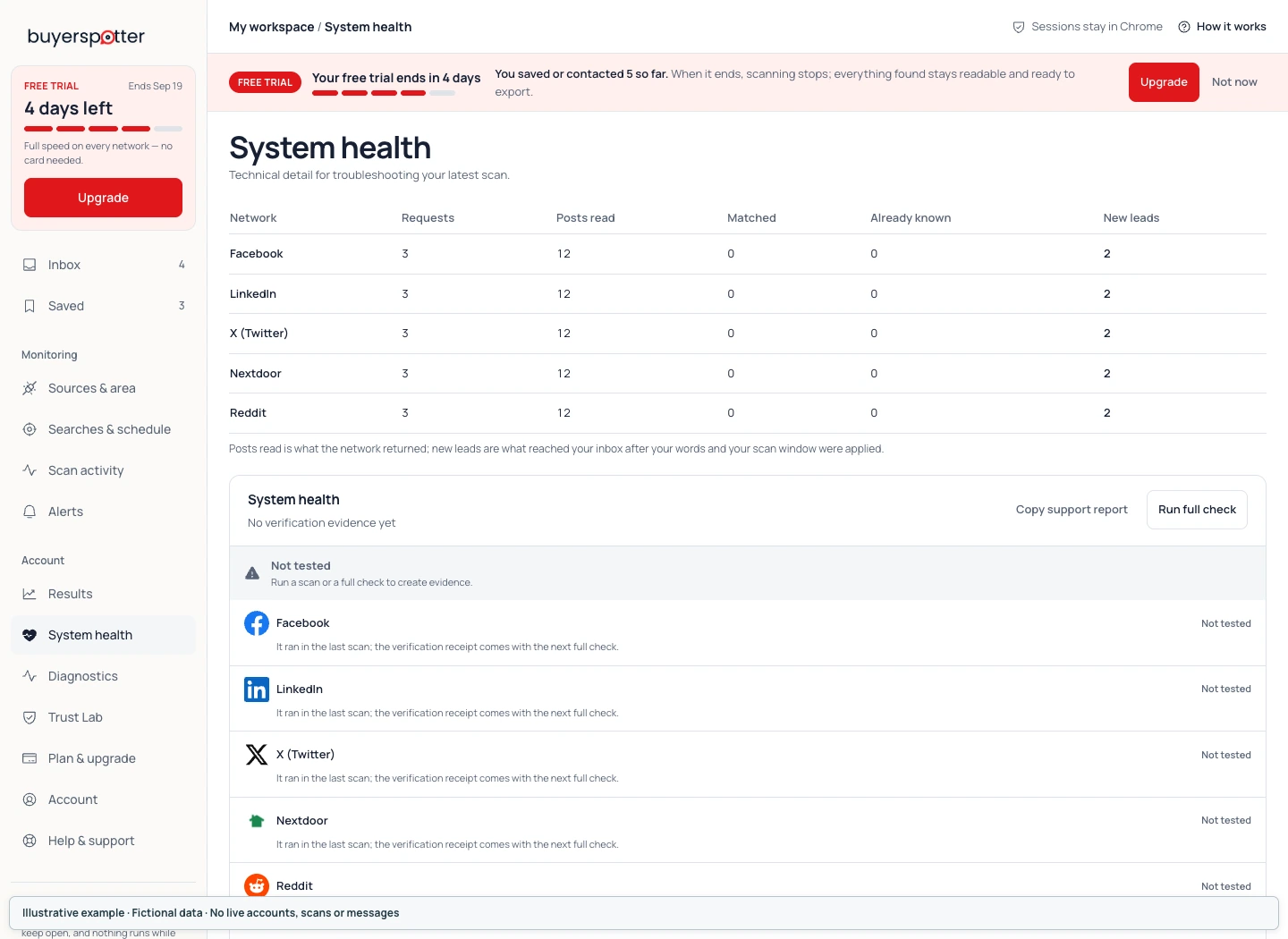 Enlarge screenshot
 Diagnostics: copy the log when support needs it
Diagnostics shows local engine events. Use its level filters to narrow the view, Refresh to read current data, or Copy log and Download log when support asks for more detail. If the extension did not answer, follow the message and try opening it again before refreshing.
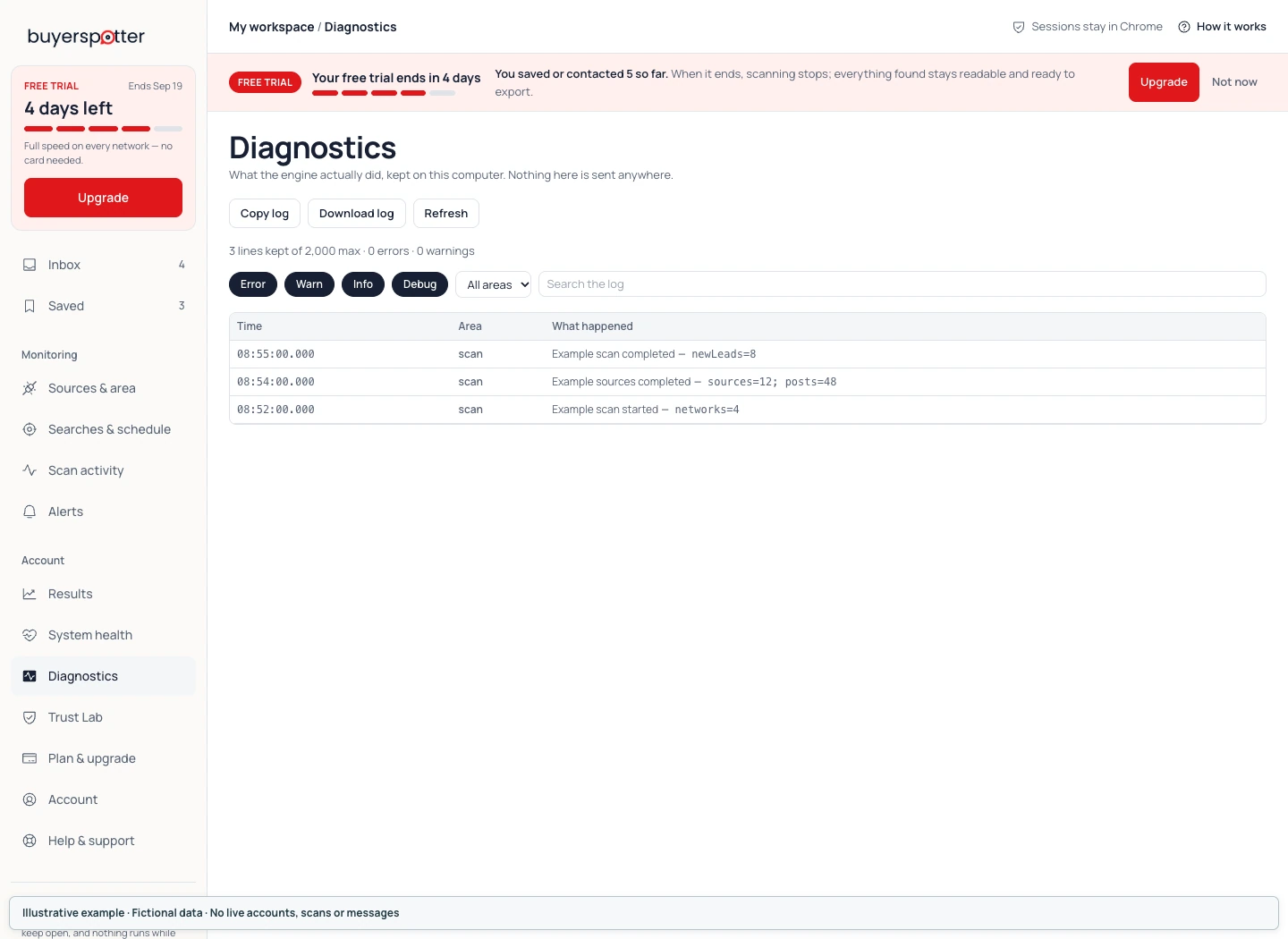 Enlarge screenshot
 Trust Lab: investigate a missed post or repeated mismatch
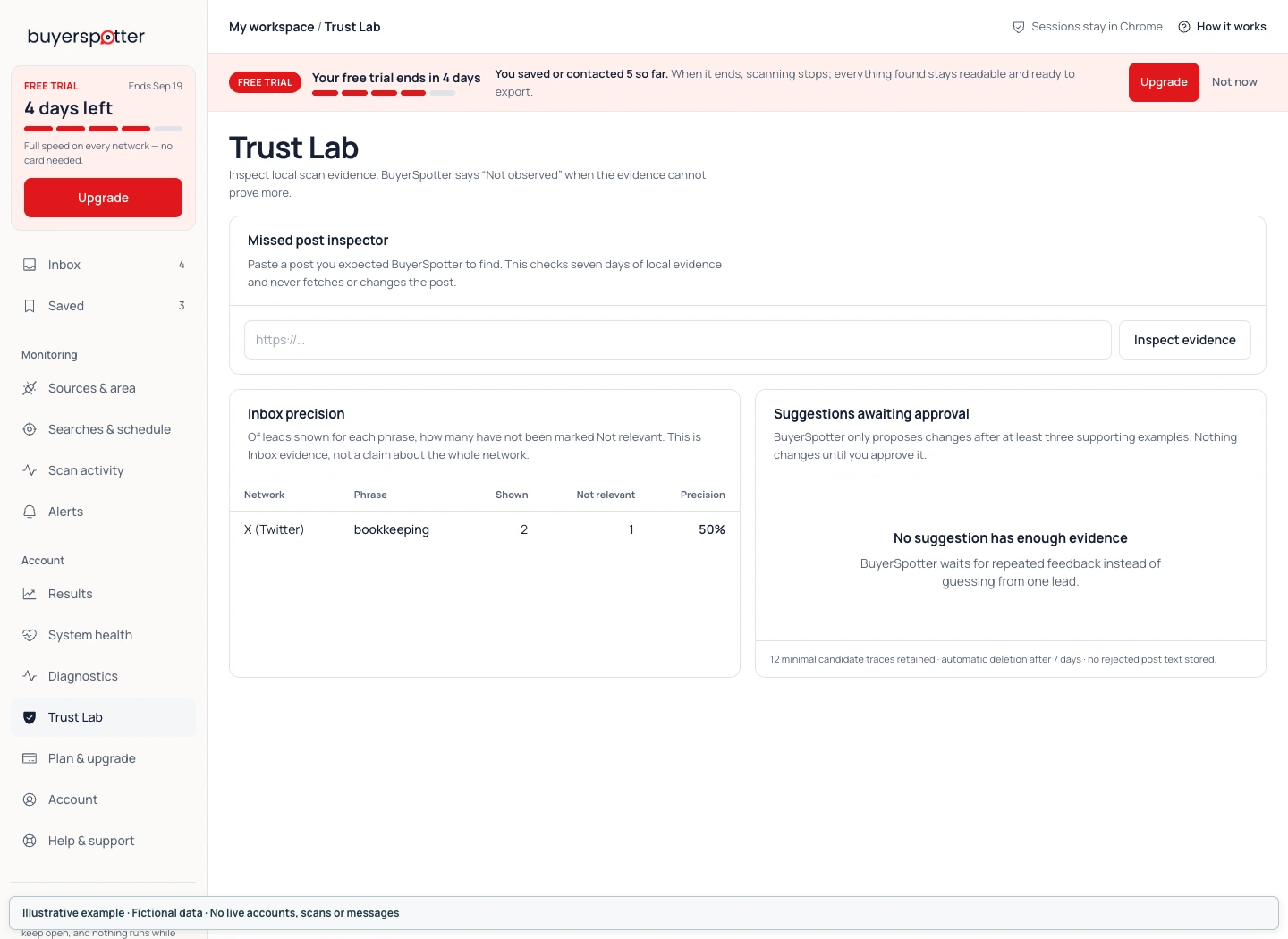
In Trust Lab, paste the URL of a post you expected and choose Inspect evidence. This checks seven days of retained local evidence; it does not fetch the post again or change it. An absence of evidence is not proof that the post never existed.
Inbox precision reflects the matches shown and the ones marked Not relevant. It does not measure every post on the network. Suggestions awaiting approval are based on repeated examples. Read the proposed effect before choosing Approve, or choose Dismiss.
 Enlarge screenshot
 For more about access and stored data, read Trust & privacy. The first-week guide gives you a simple way to evaluate completed scans over time.
Back to contentsFrequently asked questions
What does BuyerSpotter do?
BuyerSpotter is a Chrome extension that monitors Facebook groups, Reddit, LinkedIn, X (Twitter) and Nextdoor for posts where someone asks to buy, hire or get a recommendation, and alerts you so you can reply yourself. It brings matches into one Inbox with their source and matching evidence. You decide whether to open, save or respond to each post.
Which networks can I use?
BuyerSpotter supports Facebook groups, LinkedIn, X, Nextdoor and Reddit. Facebook uses the groups you select. LinkedIn and X use your shared search phrases. Nextdoor uses those phrases within the distance and content available to your account. Reddit uses the same phrases across all of Reddit, or only in the subreddits you choose, and is read without signing in. Facebook, LinkedIn, X and Nextdoor each need a usable signed-in Chrome session. Check each network's current status in your installed version.
Why is a Facebook group missing from the list?
Check that you can open the exact group in the same Chrome profile. A partial or interrupted discovery can leave the list incomplete. Review the access message, then use the group-link entry for an accessible group that is still missing. Pending live access check is not confirmation that the group was read. After setup, use Sources & area, then Edit Facebook groups and Save Facebook groups.
Does BuyerSpotter work when my computer is off?
No. Scans need Chrome, an awake computer and access to your selected networks. A schedule is not an always-on cloud service. Sleep, sign-in changes, network problems and source-page changes can delay or interrupt a check.
Should I add a broad keyword or a long sentence?
Start with a few short phrases that describe your service or the customer's problem. A broad word can collect unrelated mentions; a long sentence can miss different wording. Compare the original posts after a completed scan and change one phrase at a time.
Does a post have to match every phrase?
No. The shared search list works as alternatives: matching one included phrase can make a post eligible. Adding a separate city or customer type does not require every result to contain it. Review those requirements in the original post.
Can I use phrases in another language?
Yes. Enter phrases in the language people use in the sources you read. Add a translated or differently worded phrase as its own entry when you need it. BuyerSpotter does not silently translate your list or invent synonyms.
Does the intent label mean someone is ready to buy?
No. Intent labels are local, rule-based clues used to explain and order keyword matches. They do not verify budget, purchasing authority, location, readiness or likely sales. The Only buying-intent posts alert setting narrows what is sent; it does not turn an Inbox match into a confirmed customer.
Why do I see an irrelevant post?
Your phrase may also appear in a promotion, a job post, a quotation or a request outside your service area. Open the post, mark it Not relevant when appropriate and keep the reason. Refine a phrase or source before adding a broad exclusion that could hide useful requests.
Why are there no results?
First check Scan activity. A completed check with no matches and an unfinished or unavailable source need different responses. If the check completed, read a small sample directly at the source, compare its wording with your phrases and review exclusions. An empty Inbox does not prove there are no relevant posts anywhere on the network.
Why can I not select a 15-minute interval?
The minimum is 15 minutes for up to 7 Facebook groups and 5 phrases. Larger setups with up to 15 groups and 10 phrases require at least 30 minutes. More than 15 groups requires at least 45 minutes, within the 25-group and 10-phrase limits. The control shows the minimum that applies before you save.
Does Connected mean alerts are arriving?
No. A channel must be connected and switched On. Its routing settings must also allow the alert. Use Send test while no scan is running, check the delivery result and confirm receipt at the destination. A test message is separate from a new match found by a real scan.
Can I connect Slack?
There is no native Slack sign-in flow in this version. The Webhook channel posts a JSON message to an HTTPS destination you supply. If you use Slack or another service, configure a destination or intermediary that accepts the BuyerSpotter payload, then verify it with Send test.
Will BuyerSpotter reply or send messages for me?
No. Open the original post, read its replies and follow the community rules. Drafts, templates, notes, Saved and Contacted are tools for your own work. Copying a draft or marking a post Contacted does not publish or send it.
Do my two installations share the same Inbox?
No. The installation allowance is not Inbox synchronization. Matches, settings, drafts and follow-up records are local to each extension installation. Removing the extension can remove that local data. Manage paid renewals separately on your billing page.
When does my trial start?
The 5-day Premium trial starts after your first successful live scan, with no card required. Reading this guide, viewing example screenshots or preparing setup does not start a trial. Check Plan & upgrade and the pricing page for your current access and plan details.
What happens when my trial ends?
When trial access expires, scanning stops. The leads already found remain readable and exportable, including their saved status, notes and reply drafts. Open Plan & upgrade to review access options. You do not need to remove the extension to decline an upgrade; removing it can delete local records.
How do I export my existing leads?
Open Results and choose Export CSV near the date-range controls. Check that the file downloaded. Export includes stored leads, not just the date range selected for the charts, and does not delete them. Existing leads remain exportable when scanning access expires. Treat the file as private business data.
Are these screenshots real customer results?
No. They show current BuyerSpotter components with fictional business details, requests, account information and scan states. The screenshots explain the controls. They do not demonstrate live source access, alert delivery, billing or customer outcomes.
About these screenshots
The screenshots render BuyerSpotter's current product components in an isolated demonstration. Business names, posts, source names, account details, results and operational states are fictional. No customer data is used. Example values help explain what to read or click; they are not performance claims.
Each image has an enlargement link. Your installed version, theme, access state and available sources can change what you see. For an error in your own installation, report the exact version and message through setup support.
For a shorter product overview, see How BuyerSpotter works.