

Your first useful request, step by step.
Try the workflow with an Austin bookkeeper. See what to set up, what a completed scan means, and what happens after a match.
Step 1 of 5
Build your phrasesDescribe the work you want to win.
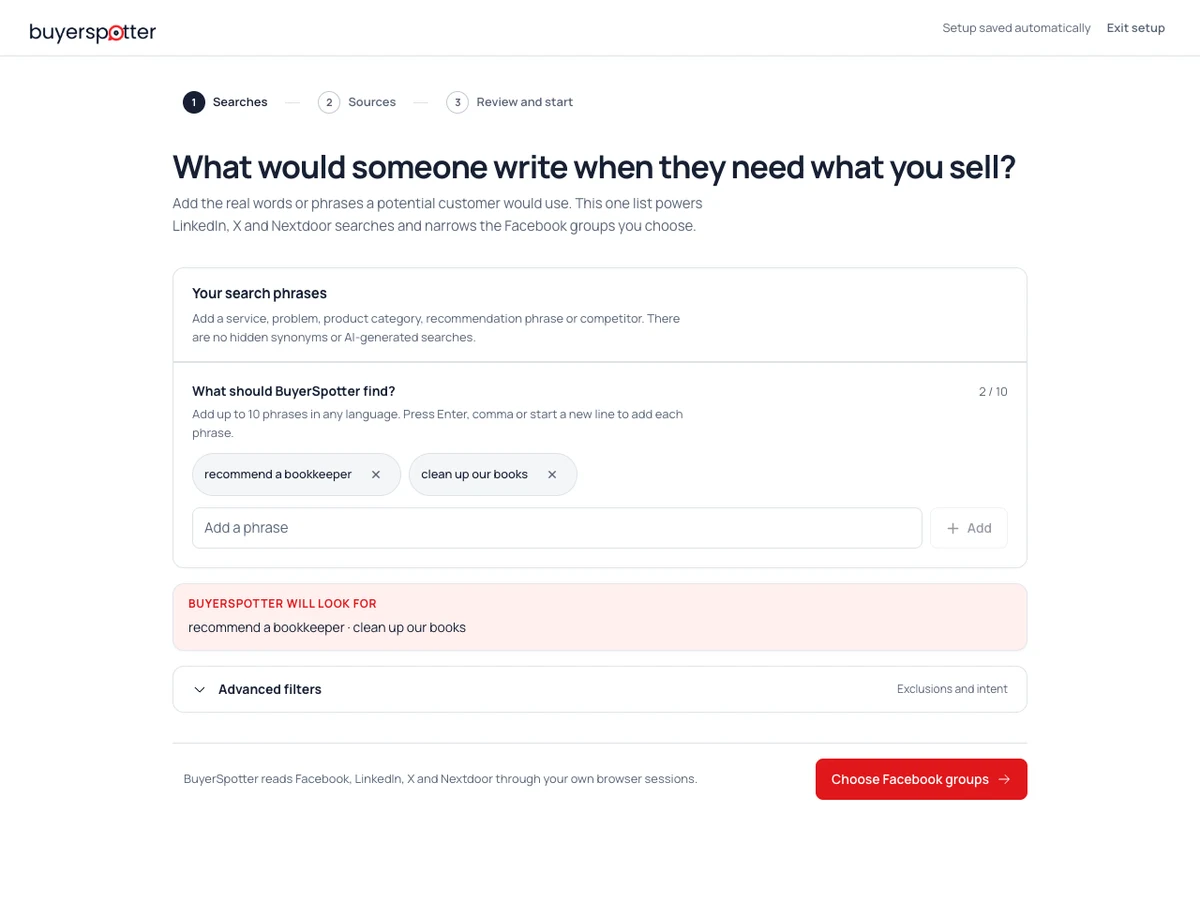
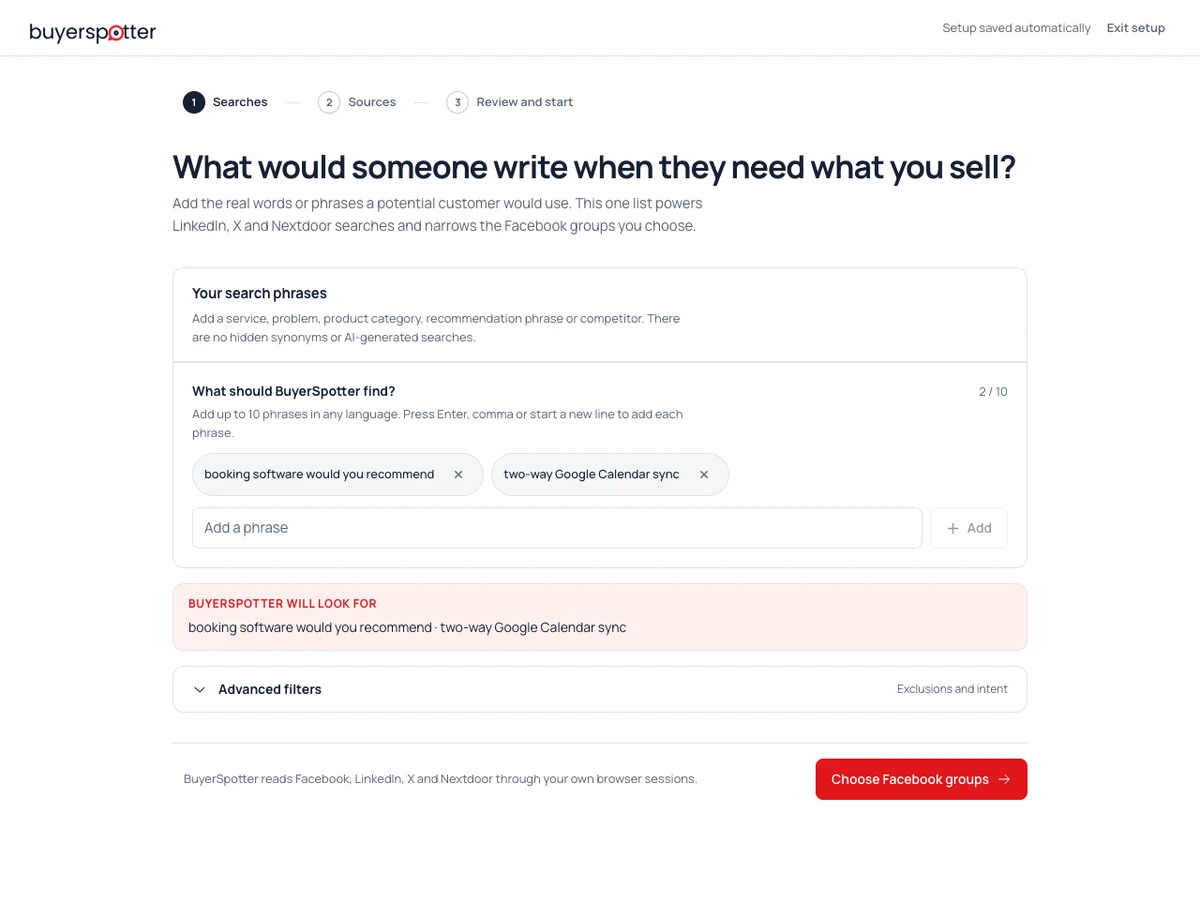
In the workspace, open Searches & schedule and choose Edit to revise your offer and phrases. During first-time setup, start with Your search phrases instead. Add exclusions only after checking which useful requests they might remove.
Need ideas for your phrases?Searches & schedule
Example values- What you sell
- Catch-up and monthly bookkeeping for small businesses in Austin.
- Look for
- recommend a bookkeeperclean up our books
- Always ignore
- bookkeeping jobtraining course
These are example values, not editable fields or a screenshot.
Choose places where those buyers ask.
Start with a small, relevant set of sources your account can access. A promotions feed may contain your keyword without a buyer asking for help.
You choose the sources. BuyerSpotter does not grant access to private communities.
Source selection
Example- Austin independent businesses
Selected · Business questions and recommendations
- Local business recommendations
Selected · Requests in the service area
- General promotions feed
Left out · Mostly businesses advertising
The names are fictional. No account is connected by this page.
Check that the scan actually finished.
In the extension, use Scan now and review source completion. A connected network alone does not prove its sources were scanned.
Keep Chrome open. BuyerSpotter reads through your own signed-in browser, so it scans only while Chrome is running — minimised is fine — and pauses while the computer is asleep or shut down. If a source needs attention, check its details and account access before running another scan.
Scan status
Simulated, not a live scan2 of 2 sources completed
Both example sources finished. You can now review the results.An incomplete scan is not the same as finding no relevant requests.
Read the request behind the match.
Check what the person needs, where they need it and when. Open the original post in the product to review the full conversation before replying.
A match helps you decide what to review. It does not guarantee the person will become a customer.
Catch-up bookkeeping
Example requestAustin independent businesses Posted 12 minutes ago · Example timing
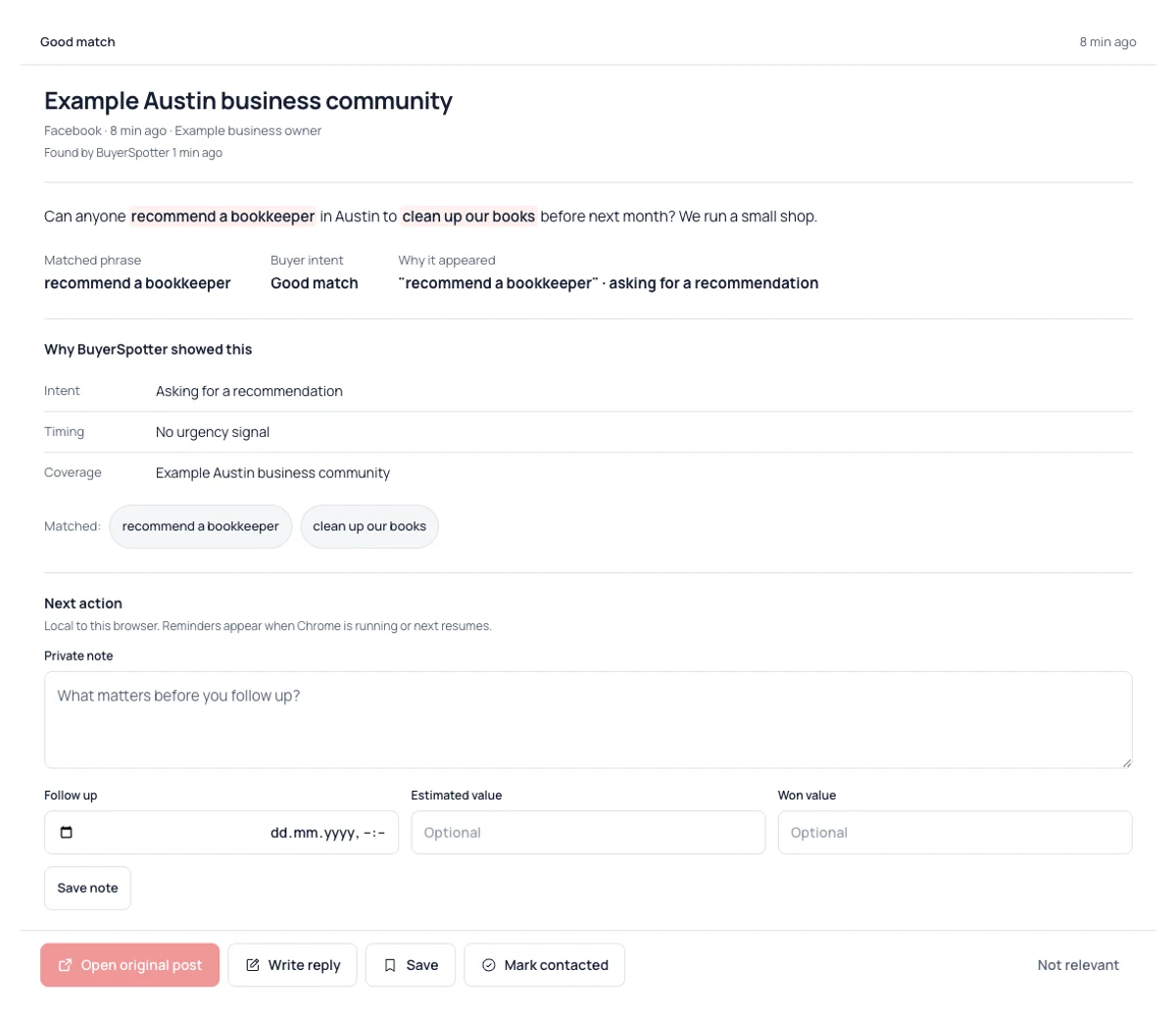
"Can anyone recommend a bookkeeper in Austin to clean up our books before next month? We run a small shop."
- Need
- Asks for bookkeeping help
- Fit
- Small business in Austin
- Timing
- Before next month
Save the context. Choose your next action.
Keep a note with the opportunity. Mark it contacted only after you have reached out yourself. BuyerSpotter does not send the reply.
Build your search phrases Read the setup guideCatch-up bookkeeping in Austin
New- New
- Saved
- Contacted
- Private note · Example
- Ask how many months need catching up and which software they use.
Try Save example. Changes stay on this page; no message or reminder is sent.
This is a simplified, fictional teaching example, not a recording, a live product test or a customer result. Actual results depend on accessible sources, your settings and completed scans.
1. Describe the request you want to find
For step-by-step instructions and current product screenshots, open the complete BuyerSpotter user guide. Write down what you offer, who you can help and what would make a post irrelevant. Use the buyer's task rather than a broad category such as "business services." The keyword builder turns that brief into phrases you can review.
Example brief: "I offer monthly bookkeeping for small shops in Austin. I want requests for help with bookkeeping or a recommendation for a bookkeeper. I do not want job listings or posts advertising another bookkeeping service."
Before continuing: you should be able to explain why one request fits and a similar mention does not. This is an illustrative setup, not a reported customer result.
Other guides are listed in the resource library, and About BuyerSpotter explains how we write them.
2. Choose sources your account can already open
In the installed extension, choose available communities, searches or feeds relevant to that brief. Start with a few you already read. Open each source in your browser and check that your account can see its posts. Review the community rules before planning a response.
For the bookkeeping example, a local business community is a more useful starting point than a general accounting job feed. The source-selection guide helps you compare candidates.
Before continuing: confirm the chosen sources are available in your installed version and accessible through your signed-in account. BuyerSpotter cannot open content that the account cannot access.
3. Run a scan and check its status
Start a live scan in the extension and inspect the status of the sources you selected. Your first successful live scan starts the 5-day Premium trial; a website demonstration does not start it.
- Completed check, no matches: the result count alone does not show a fault. Read a small sample at the source to check whether suitable requests exist and whether your phrases describe them.
- Unavailable source or incomplete check: open the source directly, check sign-in and access, and review the status shown in the extension before treating its results as complete.
- Repeated interruption: note the extension version, source, time and exact status. Send those details through setup support without passwords, API keys or unrelated private information.
The minimum scan interval is 15, 30 or 45 minutes depending on the number of phrases and selected Facebook groups. You can choose a longer interval in Searches & schedule. See the schedule guide. Keep the computer awake and Chrome running. Sleep, network problems and changes to source pages can delay checks, so the schedule is not a promise of uninterrupted monitoring.
4. Read the evidence behind a match
Read the request, its source, the post time and the reason it matched. Then open the original conversation to check the replies and any newer information. Use the opportunity checklist when a detail could change your decision.
Example: "Can anyone recommend a bookkeeper for a small Austin shop? We need help each month." The service, location and recurring need match the example brief. The post does not establish a budget or confirm that the author still needs help.
Before continuing: identify the wording that makes the post relevant and any fact you still need to confirm. A match explanation is a reason to review a conversation, not proof of a future sale.
The bookkeeping example is expanded in how to get bookkeeping clients.
5. Save the request and keep track of your response
Save a request you want to revisit. When you can help and the source permits it, write a relevant response manually in the original conversation. Mark it as Contacted only after you have made that contact; changing the status does not send a message.
For the example request, explain how your bookkeeping service meets the stated need, disclose that it is your business and ask only for a missing detail that matters. The response guide includes ways to answer without turning the thread into an unsolicited pitch.
Keep notes on the results you would open again and the ones you would skip. If the same mismatch recurs, adjust one phrase or source and compare the next completed checks. The match-quality worksheet gives you a review method without treating every saved post as a lead.
Practice spotting a useful request.
Review two requests. Keep the evidence and a useful next step.
Step 1 of 3
Optional practice with fictional examples. No accounts are connected, scans run or messages sent.
1 / Define a useful request
Set the fit boundary.
Bookkeeping for small businesses in Austin
This example business serves Austin. It does not travel to Dallas for on-site work.
- Look for
- recommend a bookkeeper
- Choose sources
- Choose communities you can access where Austin business owners ask for recommendations.
2 / Check the fit
Which request is worth opening?
Use the offer boundary: This example business serves Austin. It does not travel to Dallas for on-site work.
Choose Review or Leave for both requests.
3 / Keep the reason and next action
A buying request can still be the wrong fit.
Request 1 · Review
The writer asks for your service, names your area and gives a timeframe.
Request 2 · Leave
A genuine buyer, but the required on-site work is outside this example business’s Austin service area.
Your example review brief
Offer: Bookkeeping for small businesses in Austin
Fit boundary: This example business serves Austin. It does not travel to Dallas for on-site work.
Sources: Choose communities you can access where Austin business owners ask for recommendations.
Request to review: Can anyone recommend a bookkeeper in Austin to clean up our books before next month? We run a small shop.
Why it is worth opening: The writer asks for your service, names your area and gives a timeframe.
Request to leave: Can anyone recommend a bookkeeper for our Dallas shop? We need someone on-site every week; remote help will not work.
Why to leave it: A genuine buyer, but the required on-site work is outside this example business’s Austin service area.
Next action: Open the conversation, check that the request is still active and save a note about scope before replying yourself.
Private review note: Confirm monthly workload and current accounting software. Reply only if Austin service coverage fits.

Fictional teaching example. Verify actual product fit, current source access and the original conversation before responding.
The free search planner keeps this example editable. Nothing is searched or sent. For the product workflow, read the full setup guide.
1 / Define a useful request
Set the fit boundary.
Booking software with two-way Google Calendar sync
This example booking product supports Google Calendar, not two-way Microsoft Outlook sync.
- Look for
- booking software would you recommend
- Choose sources
- Choose relevant product discussions and owner communities you can access, not every mention of booking software.
2 / Check the fit
Which request is worth opening?
Use the offer boundary: This example booking product supports Google Calendar, not two-way Microsoft Outlook sync.
Choose Review or Leave for both requests.
3 / Keep the reason and next action
A buying request can still be the wrong fit.
Request 1 · Review
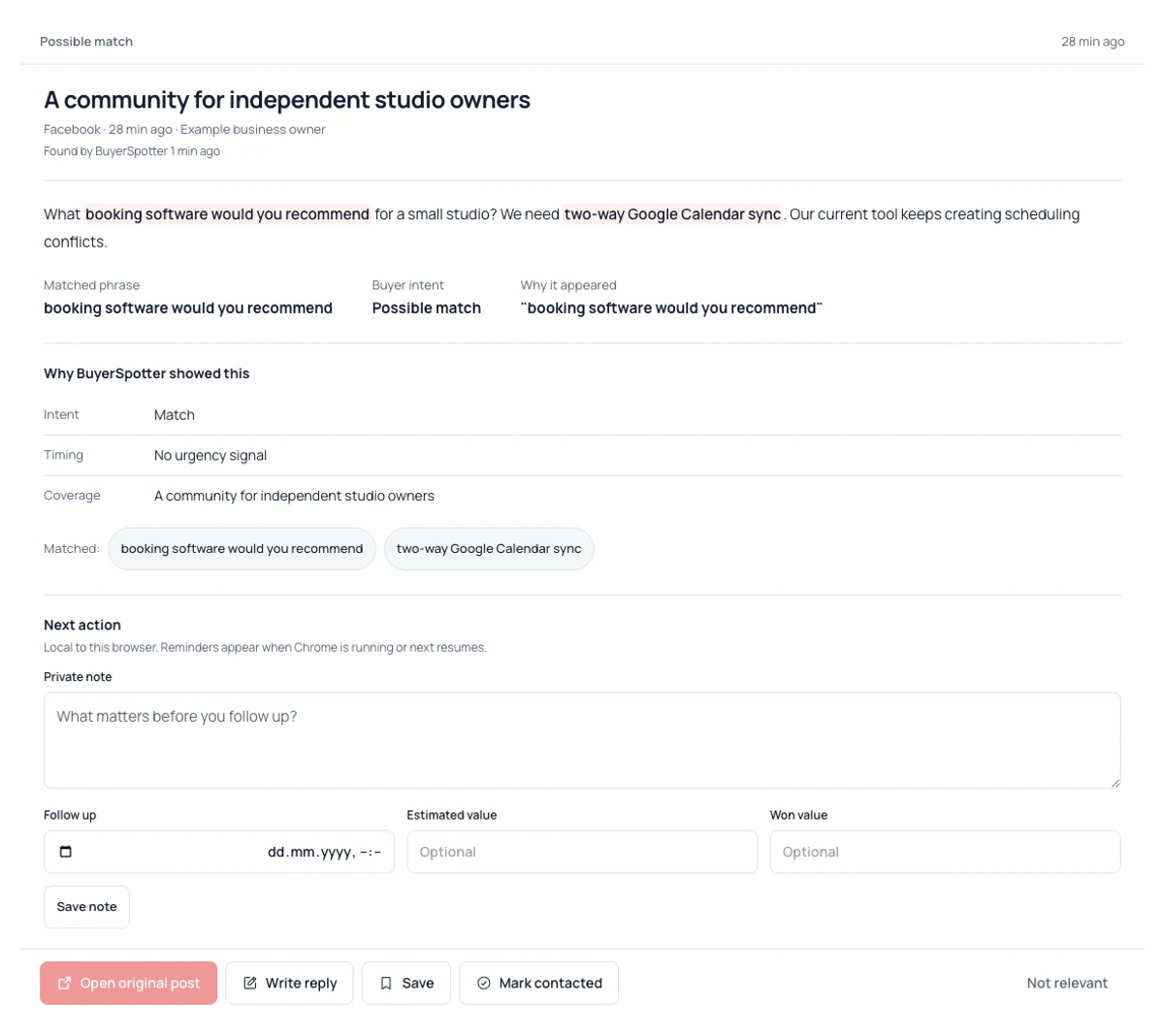
The writer is looking for a product, names a required integration and explains why they want to change.
Request 2 · Leave
A genuine software request, but this example product cannot meet the buyer’s required Outlook integration.
Your example review brief
Offer: Booking software with two-way Google Calendar sync
Fit boundary: This example booking product supports Google Calendar, not two-way Microsoft Outlook sync.
Sources: Choose relevant product discussions and owner communities you can access, not every mention of booking software.
Request to review: What booking software would you recommend for a small studio? We need two-way Google Calendar sync. Our current tool keeps creating scheduling conflicts.
Why it is worth opening: The writer is looking for a product, names a required integration and explains why they want to change.
Request to leave: What booking software would you recommend for our studio? Two-way Microsoft Outlook sync is essential; Google Calendar will not work for us.
Why to leave it: A genuine software request, but this example product cannot meet the buyer’s required Outlook integration.
Next action: Open the request, check the required integration against your actual product and explain both the fit and any limitation.
Private review note: Check calendar sync requirements, team size and migration needs. Do not promise a feature we do not support.

Fictional teaching example. Verify actual product fit, current source access and the original conversation before responding.
The free search planner keeps this example editable. Nothing is searched or sent. For the product workflow, read the full setup guide.
1 / Define a useful request
Set the fit boundary.
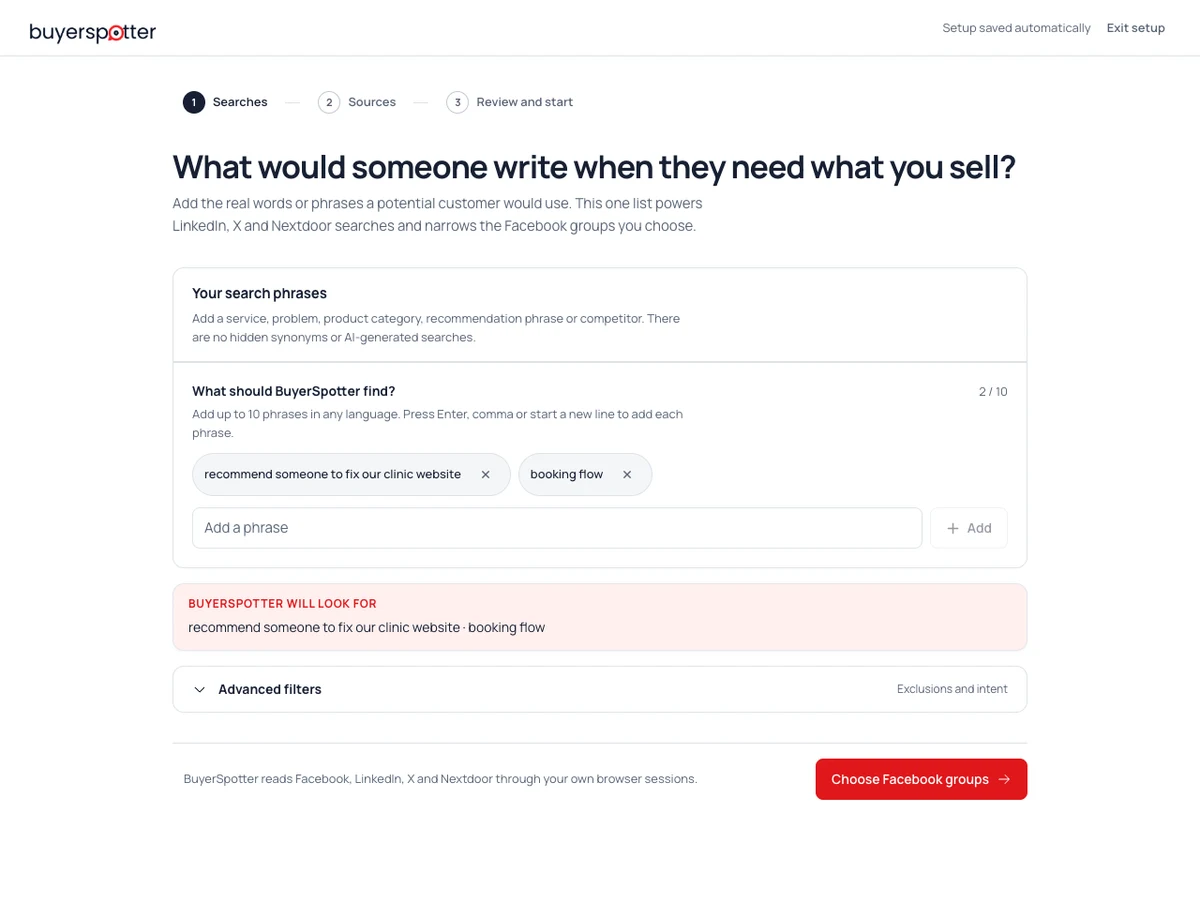
Website improvements for appointment-based businesses
This example agency sells professional website work. A request for DIY instructions is not a request to hire it.
- Look for
- recommend someone to fix our clinic website
- Choose sources
- Choose owner communities and business discussions you can access where the problem is described in the customer’s words.
2 / Check the fit
Which request is worth opening?
Use the offer boundary: This example agency sells professional website work. A request for DIY instructions is not a request to hire it.
Choose Review or Leave for both requests.
3 / Keep the reason and next action
A buying request can still be the wrong fit.
Request 1 · Review
A business describes a concrete website problem and explicitly asks for professional help.
Request 2 · Leave
The problem fits the agency’s work, but the writer explicitly wants DIY help, not a paid provider.
Your example review brief
Offer: Website improvements for appointment-based businesses
Fit boundary: This example agency sells professional website work. A request for DIY instructions is not a request to hire it.
Sources: Choose owner communities and business discussions you can access where the problem is described in the customer’s words.
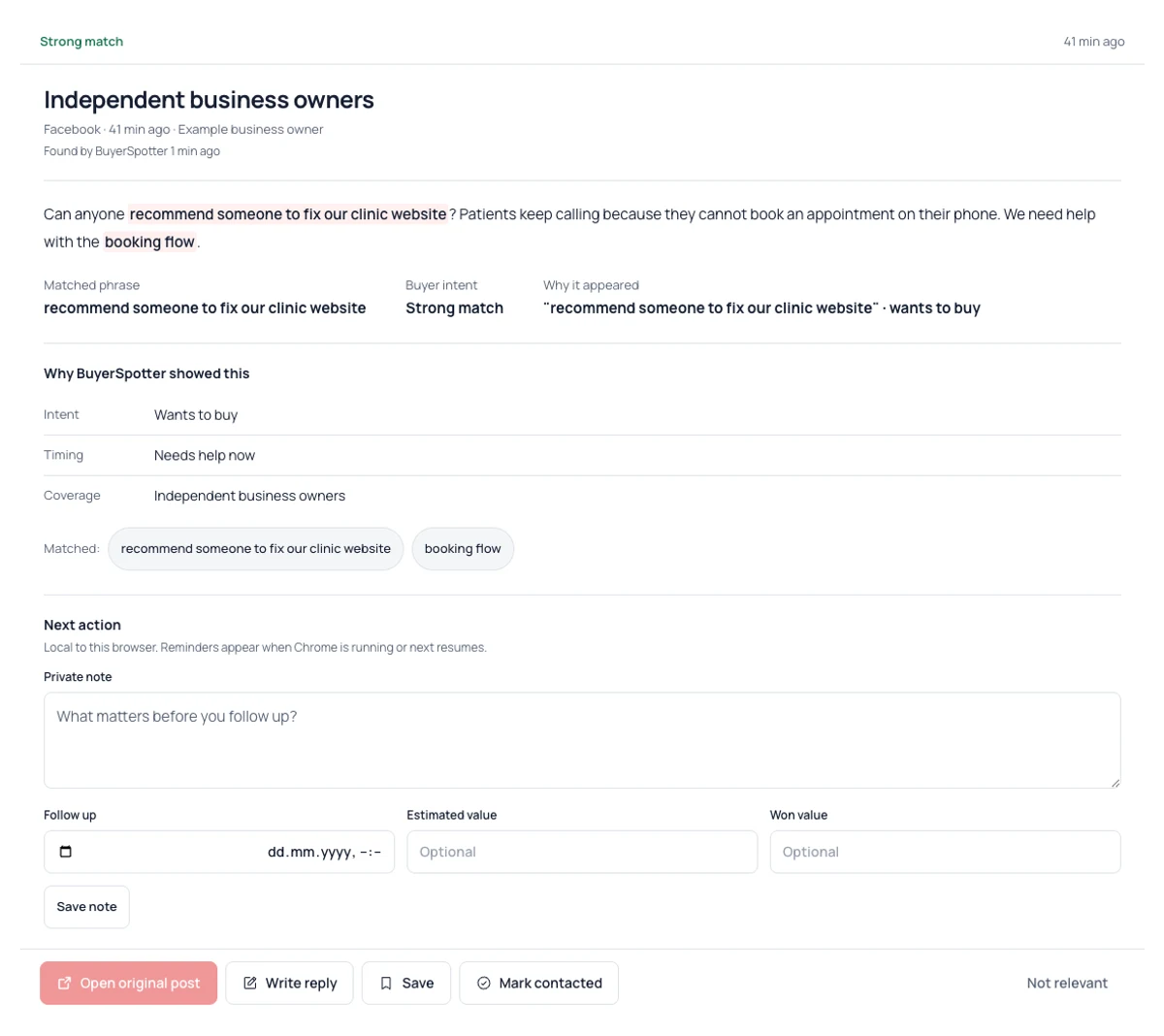
Request to review: Can anyone recommend someone to fix our clinic website? Patients keep calling because they cannot book an appointment on their phone. We need help with the booking flow.
Why it is worth opening: A business describes a concrete website problem and explicitly asks for professional help.
Request to leave: Our clinic’s mobile booking page is broken. Can anyone share a tutorial so I can fix it myself? We are not looking to hire someone.
Why to leave it: The problem fits the agency’s work, but the writer explicitly wants DIY help, not a paid provider.
Next action: Read the original request, clarify the booking issue and offer one relevant next step rather than a generic agency pitch.
Private review note: Review the mobile booking path and ask which booking system is used. Propose a scoped review, not an unverified revenue claim.

Fictional teaching example. Verify actual product fit, current source access and the original conversation before responding.
The free search planner keeps this example editable. Nothing is searched or sent. For the product workflow, read the full setup guide.
Product-interface captures: version 0.8.6 · 2026-09-08. Fictional data, not a live scan. Open an image for the full interface.