
Short answer
To measure the quality of buyer-intent matches, write a definition of useful before reviewing, label a reproducible sample as useful, unclear or irrelevant, and report useful share with the count, such as 12 of 20. Track review minutes per useful match, check source posts for known misses, and keep sales results separate.
Let BuyerSpotter watch your groups and searches for you. 5-day trial, no card needed.
Add to ChromeKey takeaways
- Use three labels, useful, unclear and irrelevant, and never quietly count unclear results as successes.
- Report the denominator with every percentage, and keep it the same across periods.
- Review effort equals review minutes divided by useful matches; with zero useful matches, report total time instead.
- You cannot calculate complete recall without knowing every relevant request in the scope; check a known sample instead.
- Match quality is not revenue; track responses, conversations and won work separately.
Define a useful match before the review
A useful match is a request worth inspecting for your business, based on a stated service, buyer, scope, and source. It does not need to become a customer to be relevant. Write this definition before reviewing a sample so the outcome does not change the label.
Use three labels: useful, unclear, and irrelevant. Add one main reason for irrelevant results. Do not hide unclear cases by quietly assigning them to the successful group.
If you are new to the idea, start with the buyer-intent monitoring guide.
Practice with a complete 20-row review
The following dataset is synthetic. It is not a BuyerSpotter export, a customer result or a performance benchmark. The example offer is outsourced bookkeeping cleanup and ongoing books for small retailers in North Austin. In these invented summaries, "local" and "nearby" mean North Austin; no real location was inferred from a profile or group membership.
A useful match states relevant work and enough buyer context to justify opening the thread. Missing basic need or service-area evidence remains unclear. A permanent employment requirement, a different service or on-site work outside the area is irrelevant for this offer, even when the request is genuine.
Swipe sideways for more columns, if needed.
| ID | Invented request or post summary | Label | Review reason |
|---|---|---|---|
| 01 | Local shop asks for a bookkeeper to clean up overdue records. | Useful | Relevant work, buyer and area. |
| 02 | North Austin retailer requests outside bookkeeping-cleanup help before month-end. | Useful | Explicit bookkeeping service request within scope and area. |
| 03 | Store owner says the books are a mess, without asking for help. | Unclear | Problem stated; active request unknown. |
| 04 | North Austin shop asks for recommendations for outsourced bookkeeping. | Useful | Provider request fits the offer and stated area. |
| 05 | Local retailer is training a replacement but explicitly requests outside cleanup help meanwhile. | Useful | A difficult positive: training language appears in an outsourced-service request. |
| 06 | Course provider promotes bookkeeping training. | Irrelevant | Seller promotion. |
| 07 | Nearby retailer asks who can organize overdue business records. | Useful | Buyer describes the cleanup job. |
| 08 | Local shop seeks monthly books after an initial cleanup. | Useful | Both tasks fall within this example offer. |
| 09 | Someone asks for an accountant; business type and work are absent. | Unclear | Insufficient service and buyer context. |
| 10 | North Austin retail owner asks for outside help reconciling past records. | Useful | Relevant cleanup request in the stated area. |
| 11 | Local shop asks to compare bookkeepers for overdue books. | Useful | Evaluation request for fitting work. |
| 12 | Local retailer asks for bookkeeping help but specifies a permanent employee, not an outside provider. | Irrelevant | A difficult negative: buyer, location and service fit, but engagement type does not. |
| 13 | North Austin retail owner needs a cleanup provider before handing records onward. | Useful | Specific task, outside-provider intent and stated area. |
| 14 | Author requests help with a personal tax return. | Irrelevant | Different service and buyer context. |
| 15 | North Austin shop asks for temporary outside help catching up its business books. | Useful | Relevant task, outside-provider request and stated area. |
| 16 | Retailer requests bookkeeping help but gives no usable area context. | Unclear | Required service area remains unresolved. |
| 17 | North Austin store asks for a cleanup quote from a provider. | Useful | Explicit request within area and service scope. |
| 18 | Distant retailer requires an on-site provider outside the service area. | Irrelevant | Explicit geographic mismatch. |
| 19 | Bookkeeper advertises open appointments to local shops. | Irrelevant | Seller promotion. |
| 20 | Local retailer asks who can take over unfinished cleanup work. | Useful | Relevant outside-provider request. |
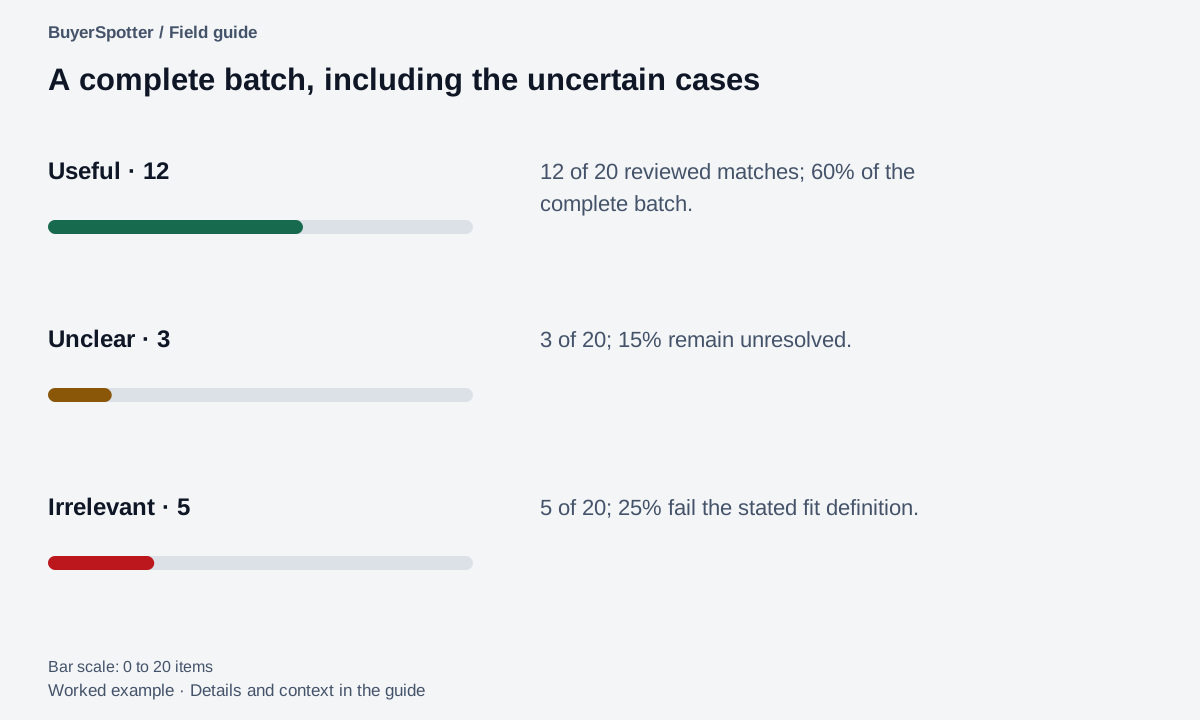
There are 12 useful, 3 unclear and 5 irrelevant rows. The labels concern relevance for review, not whether a response is allowed or the author eventually becomes a customer. In a real review, keep the original link and current-thread check privately beside each record. Do not publish private posts to make a report look more credible.
If two reviewers disagree on row 03, ask whether your definition includes problem discussions without an explicit request. Resolve that definition before relabeling the whole batch. Otherwise a change in labeling policy can look like a change in the product.
Read the example as text
- Useful · 12
- 12 of 20 reviewed matches; 60% of the complete batch.
- Unclear · 3
- 3 of 20; 15% remain unresolved.
- Irrelevant · 5
- 5 of 20; 25% fail the stated fit definition.

Write the evaluation scope before counting matches
This guide supplies a synthetic dataset and checks its arithmetic. It does not report a BuyerSpotter scan, customer result or measured detection performance. The diagrams are teaching figures, not screenshots of analytics.
- Record the review window, accessible source IDs, product version and exact configuration before labeling results.
- Choose a reproducible sample, such as every consecutive surfaced match within that window. Deduplicate repeated records of the same request before calculating its share, and record that rule.
- Define useful, unclear and irrelevant for one offer. A hard mismatch is irrelevant even when the author is a real buyer. An unresolved requirement stays unclear.
- Keep failed, pending and inaccessible source checks in a separate coverage log. An inaccessible source contributes no invented zero-result rows to the match sample.
- Record review time separately from setup, source recovery and outreach. Compare configurations only with their dates and scope visible.
Useful share describes reviewed matches. Checking missed requests needs a separate, fully inspected source sample, as shown in the bounded miss audit. Without that reference sample, do not label useful share as recall.
Choose a sample you can reproduce
Record the review dates, sources, phrases, and which matches were included. Review a fixed window or consecutive batch, rather than choosing memorable successes. Use the same approach next time.
For team reviews, have two people label a small shared sample independently. Discuss disagreements before expanding the review. If you cannot agree on fit, refine the definition before reporting a percentage.
Keep the denominator visible
Example
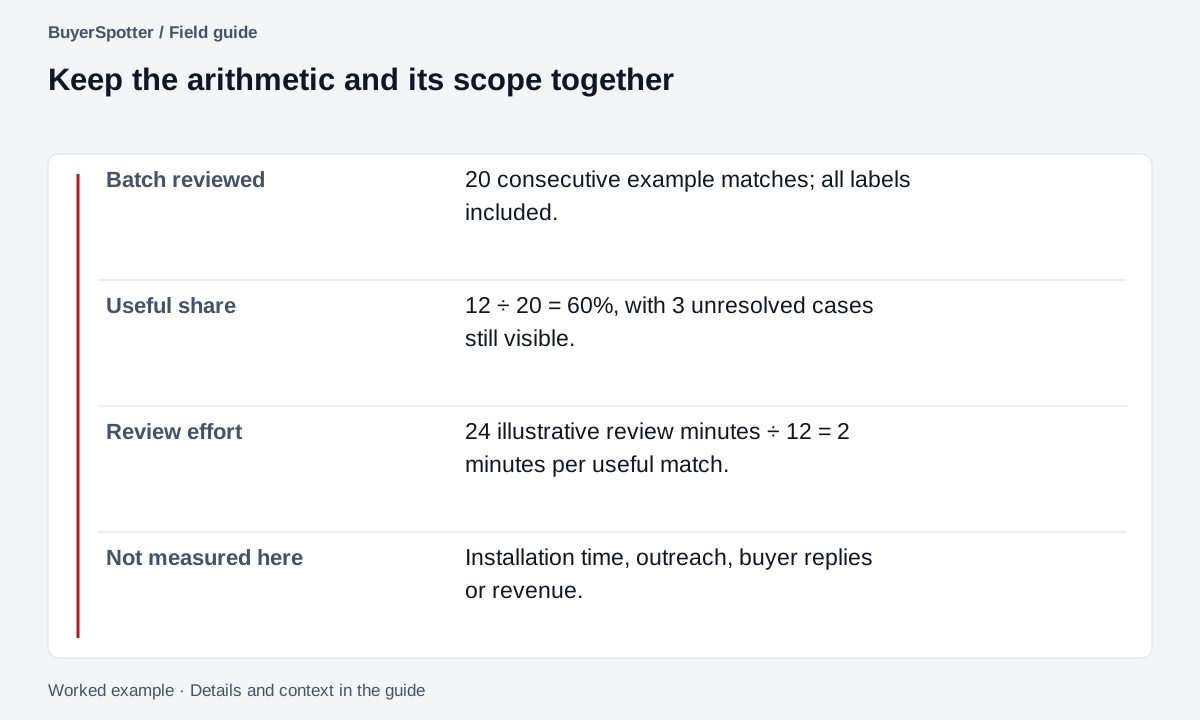
You inspect 20 matches: 12 useful, 3 unclear, and 5 irrelevant. The useful share of all reviewed matches is 12 / 20 = 60%. The unclear share is 3 / 20 = 15%.
If the review took 24 minutes, the review effort was 24 / 12 = 2 minutes per useful match. These are illustrative calculations, not BuyerSpotter performance figures or recommended targets.
Use the same denominator in later reports. Excluding unclear results from one period but not another can make an unchanged workflow appear better.
Write the report without improving the numbers on paper
Worked example · fictional
Swipe sideways for more columns, if needed.
| Measure | Calculation | Meaning |
|---|---|---|
| Useful share | 12 ÷ 20 = 60% | The fraction of all reviewed matches labeled useful. |
| Unclear share | 3 ÷ 20 = 15% | The fraction still awaiting a fit decision. |
| Irrelevant share | 5 ÷ 20 = 25% | The fraction that failed the stated fit definition. |
| Review effort per useful match | 24 minutes ÷ 12 = 2 minutes | Illustrative time spent reviewing this batch per useful result. |
| Irrelevant reasons | 2 seller promotions + 1 vacancy + 1 wrong service + 1 wrong area = 5 | A breakdown that reconciles with the rejected count. |
Suppose the reviewer clarifies row 16 and finds that it is within the service area. The revised counts become 13 useful, 2 unclear and 5 irrelevant. Useful share becomes 65%, but no new matches arrived. The report should say that an unknown was resolved; it should not describe this as a filtering improvement.
Likewise, dropping all unclear cases from the original calculation would produce 12 ÷ 17, about 70.6%. That is a different denominator, not an improvement over 60%. Keep the original labels and any later changes so the reader can reconstruct the report.
Record what the 24 minutes includes. This example counts batch review, not installation, writing replies or sales calls. If you want total workflow cost, measure those activities separately and state the scope. With zero useful matches, report total review time and zero useful results rather than dividing by zero.
Read the example as text
- Batch reviewed
- 20 consecutive example matches; all labels included.
- Useful share
- 12 ÷ 20 = 60%, with 3 unresolved cases still visible.
- Review effort
- 24 illustrative review minutes ÷ 12 = 2 minutes per useful match.
- Not measured here
- Installation time, outreach, buyer replies or revenue.
Check known misses separately
Inspect a small sample of original sources and record relevant requests you can find manually. Check whether your workflow surfaced them. Keep access issues, dates outside the scan window, and unavailable sources distinct from a qualification miss.
This is a check against a known sample. It is not a measure of all demand on a platform. You cannot calculate complete recall without knowing all relevant requests in the evaluated scope.
If the same rejection reason keeps appearing, follow the noise-reduction exercise and change one part of the setup. If the source itself has few relevant requests, revisit source selection instead of adding synonyms indefinitely.
Separate a qualification miss from an access problem
A received-match list cannot show the useful requests it never received. To inspect misses, define a small source set and time window, then review the posts you can legitimately access within that scope. Record the known relevant requests before comparing them with your results.
Worked example · fictional
In a separate, fully reviewed example scope, you identify five relevant requests manually. The workflow surfaced four. It did not surface the fifth even though that source and time window were checked. You can report "4 of 5 known relevant requests surfaced in this audited scope." This is a bounded sample result, not platform-wide recall.
A sixth candidate source could not be opened. Its unknown posts do not belong in the five-request denominator, and the report must name that coverage gap. Once access is resolved, audit that source separately rather than guessing how many requests it contained.
Swipe sideways for more columns, if needed.
| What happened | Record it as | Next action |
|---|---|---|
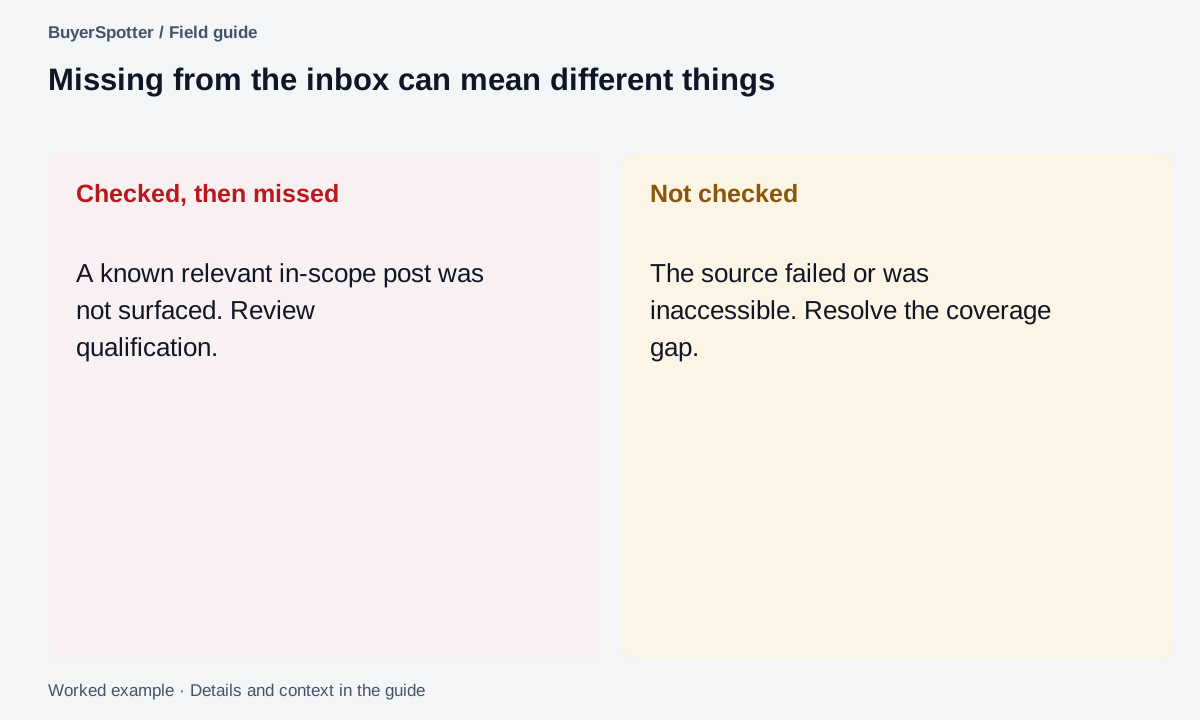
| A relevant in-scope post was checked but rejected. | Qualification miss in the audited sample. | Inspect its wording and the exclusion or fit decision. |
| The source failed or was never completed. | Coverage/access gap. | Resolve the source state before judging its match quality. |
| The post was outside the run's stated date window. | Out-of-scope request. | Keep the review windows consistent; do not silently add it to this denominator. |
Use the top observed issue to choose the next experiment. Two seller promotions in the 20-row batch suggest a buyer-versus-seller distinction to investigate. They do not establish that a global exclusion will be safe. Test a change against known useful requests and retain the old setup for comparison, as described in the noise-reduction guide.
Read the example as text
- Checked, then missed
- A known relevant in-scope post was not surfaced. Review qualification.
- Not checked
- The source failed or was inaccessible. Resolve the coverage gap.
Use formal metric names only when the labels support them
Google's classification guide defines precision as true positives divided by true positives plus false positives, and recall as true positives divided by true positives plus false negatives. The guide also discusses zero denominators and tradeoffs between false positives and false negatives. Source reviewed 6 September 2026.
Our earlier 12-out-of-20 calculation is a useful-share measure with three unresolved labels. It is not a claim of fully labeled precision. If you later resolve those uncertain cases, keep the revised labels and explain why the reported result changed.
Recall needs a defined set of relevant cases, including missed ones. A list of received matches alone does not provide that denominator. For a bounded source audit, define the time window and manually label the relevant requests you can observe; then compare which of that known set the workflow surfaced. Report the scope alongside the fraction so readers do not mistake it for complete platform coverage.
Copy a quality review sheet
Review period and source set: [record]
Definition of useful: [fit criteria]
Reviewed matches: [total]
Useful: [count]
Unclear: [count]
Irrelevant: [count]
Top rejection reason: [reason and count]
Review time: [minutes]
Known relevant posts checked: [links]
Known misses and reasons: [record]
One change for the next period: [action]
Download a blank match-quality record
Download match-quality.csv. It contains column headings only. No example percentages, formulas, customer information or benchmark rows are prefilled.
Use one row per unique reviewed request and label it useful, unclear or irrelevant. Record anonymous source and case IDs, the review window, configuration, product version, decision reason and review minutes. A later clarification belongs in Revised label with a date; keep the original label so the change remains explainable. Leave unknown values blank.
Keep source failures in the separate source-review CSV. The ID connects the records without putting an unchecked source in the match denominator. Private post text, names and any link mapping belong outside a worksheet you share.
Before calculating, check that useful + unclear + irrelevant equals the complete deduplicated match count. The three label shares should total 100% when the denominator is positive. If the batch is empty, report zero reviewed matches and leave shares undefined. If no useful match exists, report total review time without dividing by zero. Use the noise-reduction guide to choose one next change from the recorded reasons.
Separate match quality from business results
Track responses, conversations, qualified work, and revenue separately in your own records. A relevant request can fail to convert because of timing, capacity, competition, or a mismatch discovered later.
A smaller sample carries more uncertainty, and source activity changes over time. Report counts alongside percentages. When no match qualifies as useful, time per useful match has no finite value; report the total time and zero useful matches instead.
Frequently asked questions
How do you measure keyword alert quality?
Define what a useful match is, review a fixed window of matches with three labels and report the useful share alongside the raw counts and review time.
Is useful-match share the same as precision?
Not quite. It is a precision-like measure, but formal precision needs every result resolved as a true or false positive, and unclear labels leave that open.
How do I find out what my alerts missed?
Search a sample of your sources by hand for relevant requests in the same period, then check which ones the workflow surfaced. Keep access problems separate from qualification misses.
What should I do if match quality is low?
Find the most common rejection reason and change one phrase or source. The noise-reduction guide walks through the process.
Examples, sources and image method
Original worked examples and worksheets by BuyerSpotter. Requests and sample datasets are fictional. References are linked where used.