
Short answer
Keyword monitoring means checking selected sources for new mentions of words or phrases. For lead generation, combine a service or product with request language, inspect the original context and measure relevant conversations rather than raw alert counts.
Let BuyerSpotter watch your groups and searches for you. 7-day trial, no card needed.
Add to ChromeKey takeaways
- Choose a business decision before choosing a tool.
- Separate brand mentions, buyer requests and market research.
- Test inclusion and exclusion phrases against real examples.
- Record source availability as well as the results you see.
Start with a decision you can actually make
A broad alert for “marketing” can find job advertisements, agency promotions, course launches and people asking for help. Those results contain the same word but imply different actions. Write the decision first: “Find small clinic owners asking for someone to repair their online booking process.” You can now reject a marketing internship without debating whether it technically matched.
Give each monitoring brief a buyer, a problem, a source boundary and an owner. The owner is the person who will review requests and decide whether to answer. If nobody can describe the next action, the brief probably belongs in research rather than the sales inbox. Keep those two queues separate so an interesting discussion does not become an imagined lead.
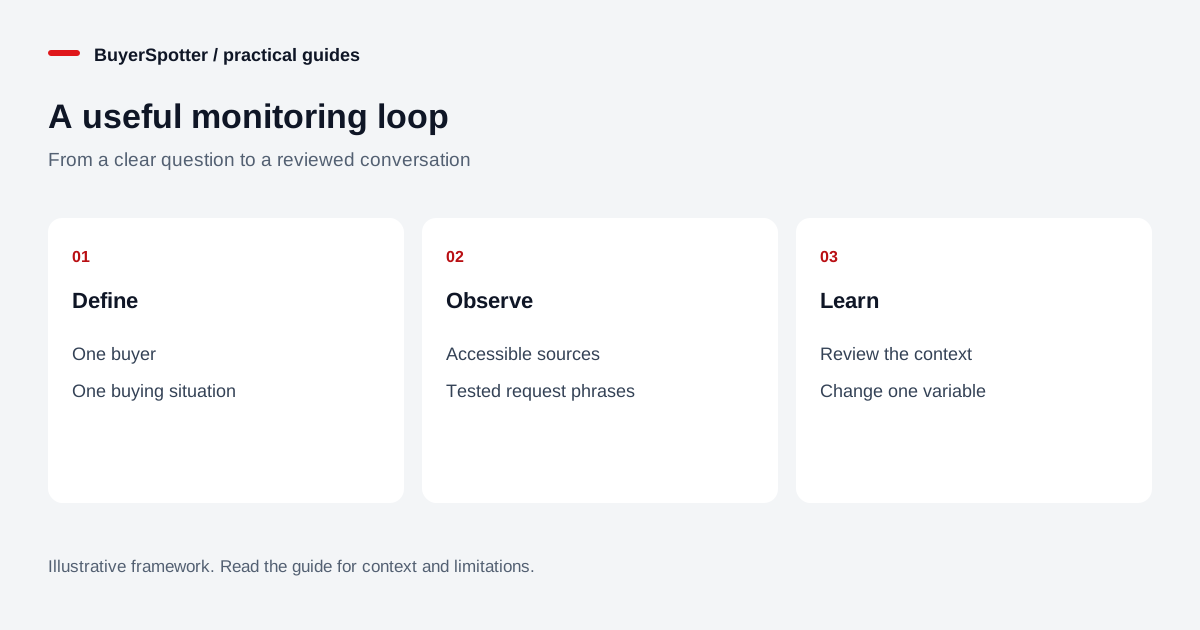
Read the diagram as text
- Define
- One buyer
- One buying situation
- Observe
- Accessible sources
- Tested request phrases
- Learn
- Review the context
- Change one variable

Match the source to the kind of evidence
Choose sources where the question is likely to be asked. A neighborhood conversation may be useful for a local appointment; a professional community may reveal software requirements. Start by reading recent discussions manually. Notice whether questions receive replies, whether vendors may participate and whether the examples match your service area or customer profile.
Swipe sideways for more columns, if needed.
| Question | Evidence to look for | Useful next action |
|---|---|---|
| Who needs this service? | A current request with a relevant location or scope | Check availability and reply if appropriate |
| What frustrates buyers? | Repeated descriptions of a workflow problem | Improve product research or messaging |
| Where is our brand mentioned? | A named reference to your business | Review support, accuracy or reputation context |
Google Alerts emails matching new Google Search results. That can complement community monitoring, but it does not establish access to every conversation inside a social platform. See our comparison of web alerts and community monitoring before treating either as a complete source.
Use the buyer’s wording, then test it
Build a small starting set around requests: “recommend a bookkeeper,” “looking for booking software,” or “need help with Shopify.” These are examples to test, not universal high-performing keywords. Write separate variants for the actual language your customers use. Avoid combining unrelated services in one phrase simply to reach a broader audience.
Keep a small test collection with three groups: clearly relevant requests, close mismatches and uncertain posts. Include a seller advertising the same service, a job seeker and an older request that has already been resolved. A phrase that finds the first group but also fills the inbox with the second needs refinement. The uncertain group should remain visible for human review rather than being relabeled to make the results look better.
Treat exclusions as experiments
Exclusion words can remove predictable noise, but broad exclusions can hide good requests. Excluding “free,” for example, might remove an irrelevant giveaway and also a buyer asking for a free initial consultation. Record the unwanted pattern first, then choose the narrowest change that addresses it.
After each change, rerun your useful examples and inspect a fresh sample. Change one important setting at a time so you can explain what improved or disappeared. If a platform or tool does not support a particular query operator, use its own fields instead. Search syntax from one network should not be assumed to work in every extension.
Make the review shorter than the searching it replaces
A practical review starts with the original request, not the alert headline. Check when it was posted, whether the author is still seeking help, whether your offer fits and whether participation rules allow a business reply. Save the original URL and the reason the post deserves attention. Keep uncertain requests distinct from qualified opportunities.
For a fictional clinic asking about failed mobile bookings, a useful first response might be: “Which booking system do you use, and does the problem happen before or after choosing a time? I work on clinic websites, so I may be able to point you toward the right fix.” The affiliation is clear and the question reduces uncertainty. It does not pretend to know the diagnosis or guarantee a result.
Measure relevance and outcomes separately
Track reviewed posts, useful requests, replies you actually sent and conversations that progressed. Divide useful requests by reviewed posts to describe the relevance of that reviewed sample. Record its dates and size. This is not recall: you do not know every relevant request the system missed. If there were no reviewed posts, the ratio is undefined, not perfect.
Then track business outcomes independently. An opened thread is not a response, and a saved post is not a customer. Compare review time and useful conversations across similar periods. If the source goes quiet or the browser was unavailable, write that down. A low count can reflect demand, wording, source access or operating time; it is not automatically evidence that more keywords will help.
Where BuyerSpotter fits
BuyerSpotter brings matching requests from supported social sources into one inbox in desktop Chrome. You select the sources and phrases, review the match and reply yourself. Chrome, the network connection and any required signed-in sessions must remain available for checks. It is not a monitoring service that keeps scanning after your computer is off.
Use the keyword builder to prepare a first brief, then test it in a small source set. Premium is $39 monthly or $390 annually; the seven-day trial needs no card and begins after the first successful live scan. Decide whether to continue using the requests you observe and the effort you save, rather than a promised lead count.
Sources and editorial method
The workflow and examples are original editorial guidance by BuyerSpotter. Google’s alert documentation was reviewed on 15 November 2026. Product operating requirements are described in our user guide and pricing page. Examples are fictional, and the review method is not a performance benchmark.
Examples, sources and image method
Original worked examples and worksheets by BuyerSpotter. Requests and sample datasets are fictional. References are linked where used.